详细介绍Details
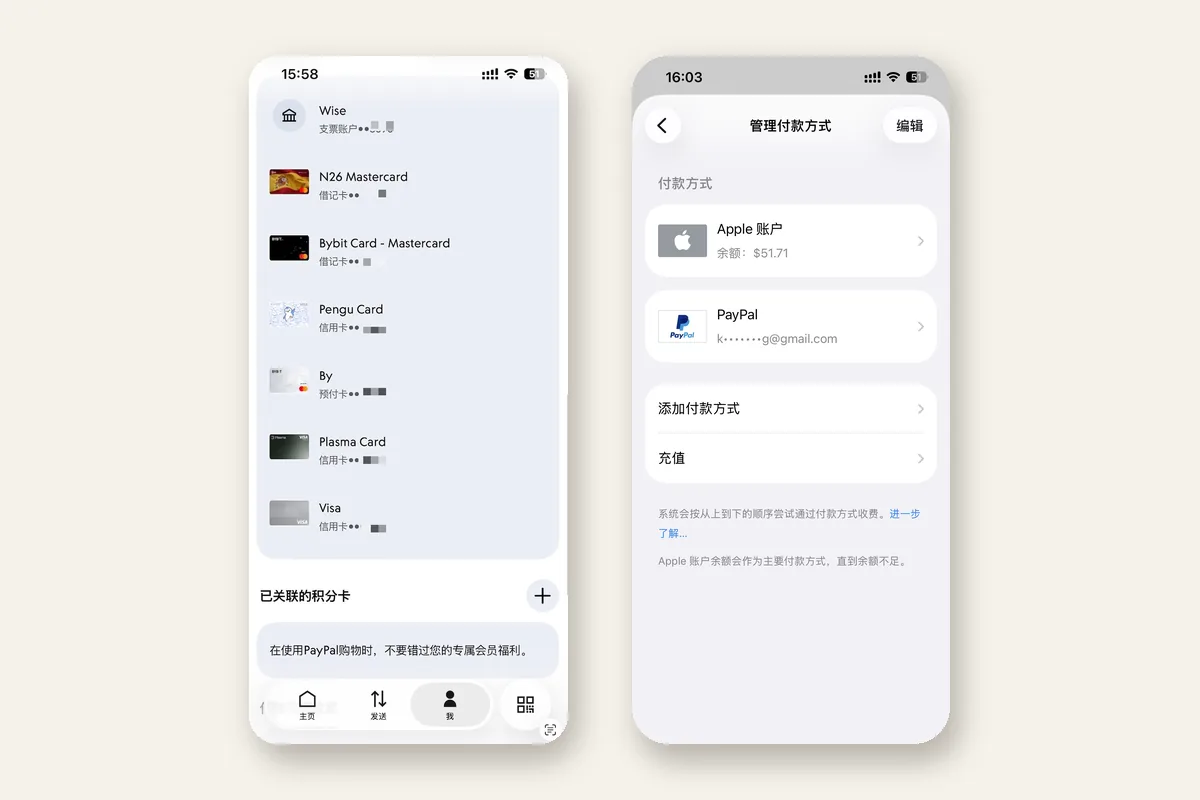
何居上(@hejushang8)2026-09-23 短帖:他的美区 PayPal 绑的是招商银行 Visa(截图尾号 2852),再挂到美区 Apple ID,用来付 App 订阅和线上购物。帖子引用同日长文《美区 PayPal 解决 99% 海外支付问题,注册及养号防封指南》。长文只讲个人账户付款:作者称可用于 AI 订阅、VPS、美区 Apple ID;收款和商业功能要 EIN / ITIN 等美国税务号,作者写明不涉及。准备项按作者清单:稳定美国节点(作者称机房 IP 也可以,在意的是登录地点别跳)、Visa 或万事达(中国发卡行也可以)、真实美国住宅账单地址、美国 +1 号(作者提到 Saily,约 1 美元)。顺序也是作者写的:paypal.com/us 开 Personal,+1 短信,姓名与卡一致,美国地址手动填(举例免税州俄勒冈),先跳过绑卡并验证邮箱,大约等一周再用同一美国节点确认正常,然后在 Wallet 绑国内 Visa / 万事达或 U 卡(作者举例 Bybit、P1、kast),账单地址用注册时那个美国地址。防封按作者经验:登录 IP 保持美国且稳定;没做 SSN / ITIN 就只当付款账户;可选 Wise 美国银行账户和验证器 2FA。本条是旁路工具笔记,完整步骤在作者长文。 He Jushang (@hejushang8), 23 Sept 2026: his US PayPal is linked to a China Merchants Bank Visa (screenshot ending 2852) and then to a US Apple ID, for app subscriptions and online checkout. The post quotes his same-day article on registering a US PayPal and keeping it from being frozen. The article stays on a personal account used to pay: the author says it covers AI subscriptions, VPS, and a US Apple ID; receiving money and business features need a US tax ID such as an EIN or ITIN, which he leaves out. Prep, in his list: a stable US node (he says a datacenter IP was enough for him; what matters is not hopping countries), a Visa or Mastercard (a Chinese issuer is fine, he writes), a real US residential billing address, and a US +1 number (he mentions Saily at about $1). His order: open Personal at paypal.com/us, verify by +1 SMS, use a legal name that matches the card, add the US address manually (he cites tax-free Oregon), skip the card and verify email, wait about a week while signing in from the same US node, then bind a China-issued Visa / Mastercard or a U-card (he names Bybit, P1, kast) in Wallet, with the signup US address as billing. His anti-freeze notes: keep the login IP in the US and stable; without SSN / ITIN, treat the account as pay-only; optional Wise US bank account and authenticator 2FA. An adjacent tool note — the full steps are in his article.
它是什么What it is
这是一条办海外账号时用得上的工具笔记,记何居上公开写的用法:美区 PayPal 个人账户,绑一张国内发行的 Visa 或万事达,再作为美区 Apple ID 的付款方式。短帖上的两张图是他自己的钱包和 Apple ID 付款页,招商银行 Visa 尾号 2852。长文把范围收在「能付款」:作者称用来订 AI、买 VPS、给美区 Apple ID 付款。收款、商业账户,以及要 EIN、ITIN 的功能,他写明不讲。本站按 Saily 美国号码那条的口径收录:相邻的实用工具,方便以后注册 AI 或 App 订阅时查阅。页面上的步骤是长文顺序的压缩,点击细节以作者文章为准。 A tool note for overseas-account setup, recording the flow He Jushang published: a US PayPal personal account, a China-issued Visa or Mastercard on it, then that PayPal as the payment method on a US Apple ID. The two images on the short post are his own wallet and Apple ID payment screen, China Merchants Bank Visa ending 2852. The article stays on “able to pay”: he says he uses it for AI subscriptions, VPS, and a US Apple ID. Receiving money, a business account, and features that need an EIN or ITIN are out of scope in his piece. This library lists it the same way as the Saily US-number note: an adjacent utility to look up when an AI or app subscription needs a payment method. The steps below compress his order; the click-by-click version is his article.
为什么推荐Why we recommend it 作者自述。主源是 2026-09-23 短帖;2026-09-24(Asia/Shanghai)用 fxtwitter 镜像核对了正文和两张图:PayPal 钱包里招商银行 Visa 尾号 2852,以及美区 Apple ID 付款方式页。副源是同日长文(article 2102588711330590720)和引用帖 2102602033488634298。机房 IP、约一周再绑卡、Saily 约 1 美元、已用约 4 个月、能付 AI / VPS,都是作者自己的说法和截图。本站没有开设 PayPal 账户,也没有绑定任何银行卡。价格和优惠码与本条无关,不转载、不复核(Saily 另见 saily-us-number-esim)。有封号风险:作者写明账号可能被冻,卡若已经绑上且账号进不去,这张卡可能解不下来。完整步骤见作者长文。不构成购买建议,也不构成金融或法律建议;PayPal 官方页面优先。预览是作者短帖两张截图拼成 3:2。 Author self-report. Primary source is the 23 Sept 2026 post; on 24 Sept 2026 (Asia/Shanghai) the fxtwitter mirror was checked for the text and both images: a PayPal wallet with a China Merchants Bank Visa ending 2852, and a US Apple ID payment-method screen. Secondary sources are the same-day article (2102588711330590720) and quote post 2102602033488634298. Datacenter IP, waiting about a week before adding a card, Saily at about $1, roughly four months of use, and paying for AI / VPS are the author’s own claims and screenshots. This site did not open a PayPal account or bind any card. Prices and promo codes are unrelated to this entry and are neither copied nor re-checked (Saily is catalogued separately as saily-us-number-esim). Freeze risk: the author writes that the account can be locked, and a card already linked to an account he can no longer open may be stuck there. Full steps are in the author’s article. Not purchase advice and not financial or legal advice; PayPal’s own pages win.
核验记录:来源、抓取与截图说明Verification log: sources, checks, and captures
不打星。Preview is the author’s two post screenshots composited to 3:2. Unrated.
对照Contrast
左列只写短帖和长文里对得上的句子。右列写本站为什么这样记,避免把作者经验写成已经替读者跑通的路径。 The left column is only what the short post and the article actually say. The right column is why this library records it that way, so the author’s experience is not written up as a path this site has already run.
作者写的 What the author wrote 本站怎么收 How this library lists it
账户用来付款 The account is for paying
作者写的 What the author wrote
个人账户,用来付款。作者称 AI 订阅、VPS、美区 Apple ID 都可以。短帖补了 App 订阅和线上购物。长文标题里的「99%」是作者的说法。他同时写:美区最难注册、风控最严,开出来的是只能付款的版本。 A personal account, used to pay. The author says AI subscriptions, VPS, and a US Apple ID all work for him. The short post adds app subscriptions and online shopping. The “99%” in the article title is his wording. He also writes that the US region is the hardest to open and the strictest on risk, and that what he ended up with is a pay-only account.
本站怎么收 How this library lists it
收录口径停在付款旁路。收款、理财、借记卡、加密交易和商业账户,作者自己标成需要美国税务号,本条不展开,也不把标题里的比例当成测量结果。 The listing stops at a pay-side path. Receiving, savings, debit, crypto, and a business account are what the author himself ties to a US tax ID, so this entry leaves them out and does not treat the percentage in the title as a measured result.
卡和账单地址 Card and billing address
作者写的 What the author wrote
短帖截图是招商银行 Visa,尾号 2852,持卡人 HE JU SHANG,账单地址在俄勒冈。长文写:中国发行的 Visa / 万事达可以,Bybit、P1、kast 等 U 卡他称也能绑上;账单地址填注册时用的那个美国住宅地址,不要用 PayPal 弹出的、可能跑出免税州的候选。 The short-post screenshot is a China Merchants Bank Visa ending 2852, cardholder HE JU SHANG, billing address in Oregon. The article says a China-issued Visa / Mastercard can be used, and that U-cards such as Bybit, P1, and kast bound for him; billing is the US residential address from signup, not a PayPal suggestion that may leave the tax-free state.
本站怎么收 How this library lists it
尾号、银行和俄勒冈地址都来自作者自己贴出的截图。本站没有登录 PayPal,没有绑卡,也没有向 Apple 付过款。卡组织或 PayPal 当日是否仍接受这种绑法,以官方页面为准。 The last four digits, the bank, and the Oregon address come from screenshots the author posted. This site did not sign in to PayPal, bind a card, or pay Apple. Whether the card network or PayPal still accepts that link is a question for the official pages.
注册顺序 Signup order
作者写的 What the author wrote
美国节点打开 paypal.com/us,选 Personal。人机验证后填邮箱,作者建议 Google 或微软邮箱。接着 +1 短信、密码、与卡一致的真实姓名、手动添加的美国地址(他举例俄勒冈),然后 Agree and Create Account。创建后先选 Not now,跳过绑卡,再去设置里验证邮箱。大约一周内用同一个美国节点,浏览器和 App 都登录几次,没有异常提示再进 Wallet 绑卡。 Open paypal.com/us on a US node and choose Personal. After the human check, enter an email; he suggests Google or Microsoft. Then +1 SMS, a password, a legal name that matches the card, and a US address added manually (he cites Oregon), then Agree and Create Account. After creation, choose Not now and skip the card, then verify email in settings. For about a week, sign in a few times from the same US node in both the browser and the app; open Wallet and add the card only if nothing looks wrong.
本站怎么收 How this library lists it
这里只留顺序,方便和长文对照。逐步点击、地址怎么手动加,都在作者文章里。本站没有走完注册。作者把「先别绑卡」说得很具体:号如果被封且进不去,已绑的卡可能解不下来,以后也绑不到新的 PayPal。 Only the order is kept here, so it can be checked against the article. The clicks, including how to add the address manually, are in his piece. This site did not finish a signup. He is specific about waiting: if the account is frozen and he cannot get back in, a card already linked may be stuck and unusable on a new PayPal.
防封和身份验证 Freeze risk and identity checks
作者写的 What the author wrote
作者称头几个月最容易出问题,登录 IP 不要在国家之间跳,尽量跟注册时同一个美国节点。身份验证会要 SSN,或非美国人的 ITIN;没有这些,账户做不了全部功能,他建议只用来付款。可选两步:用 Wise 开一个美国银行账户(他称自己已绑上),以及在 Settings → Security 里把两步验证换成验证器 App。他称这套账号已稳定用了约 4 个月。文末声明是个人记录,规则以 PayPal 官方页面为准。 He says the first months are the fragile ones: do not hop the login IP between countries; stay on a US node, ideally the one used at signup. Identity verification asks for an SSN, or an ITIN for someone who is not a US person; without those, the account cannot do every feature, and he says to use it only to pay. Two optional steps: open a US bank account in Wise (he says his is linked) and, under Settings → Security, switch 2-step verification to an authenticator app. He says this account has been steady for about four months. The article ends by calling itself a personal log, with PayPal’s pages as the rules that count.
本站怎么收 How this library lists it
「约 4 个月」「机房 IP 也能注册」是作者自述,本站没有复现,也不把它写成成功率。封号、卡解不下来、商店拒付,都算读者自己的支付和 KYC 风险。Wise 和 Saily 只是作者顺带提到的准备项,价格不在本条里复核。 “About four months” and “a datacenter IP was enough to register” are the author’s own report. This site did not reproduce them and does not turn them into a success rate. A freeze, a card that cannot be unlinked, and a store that declines the payment are the reader’s payment and KYC risk. Wise and Saily are prep items he mentions in passing; prices are not re-checked on this entry.
怎么试Try it
- 先读作者长文和短帖 Read the article and the short post
完整的注册、养号和防封写在 2026-09-23 的 X Article。短帖是结果:钱包里的招商 Visa,以及这张 PayPal 出现在美区 Apple ID 的付款方式里。本页只压缩顺序,不代替那篇文章。作者站点 hejushang8.com 是他的教程索引,本条不逐篇收录。 The full signup, aging, and anti-freeze write-up is the 23 Sept 2026 X Article. The short post is the result: the China Merchants Visa in the wallet, and that PayPal showing up as a payment method on a US Apple ID. This page only compresses the order. hejushang8.com is his tutorial index; this entry does not catalog every piece on it.
作者长文 Author article 引用帖 Quote post 短帖(两张截图) Short post (two screenshots)
- 对照他列的四样准备 Check the four things he lists
作者要求:稳定的美国节点(他写自己用机房 IP 注册,在意的是之后还用美国节点登录)、一张 Visa 或万事达(中国发卡行也可以)、一个真实的美国住宅账单地址、一个 +1 号码。+1 他指向 Saily,并写大约 1 美元。本站另有一条 Saily 工具笔记,价格和优惠码以那条里的作者自述为准,这里不转载。 He asks for a stable US node (he says he registered on a datacenter IP, and cares that later logins stay on a US node), a Visa or Mastercard (a Chinese issuer is fine, he writes), a real US residential billing address, and a +1 number. For the +1 he points at Saily and writes about $1. This library already has a Saily tool note; prices and promo codes stay with the claims on that entry and are not copied here.
PayPal 美国站 PayPal US home 本站 Saily 笔记 Saily note on this site 作者站点 Author site
- 按长文开个人账户,先别绑卡 Open the personal account, and skip the card
作者的顺序:Personal,+1 短信,姓名与将要绑定的卡一致,美国地址用 Add address manually 手填(他举例俄勒冈,避免候选列表带出别的州),创建后点 Not now 跳过绑卡,再验证邮箱。然后大约观察一周,同一个美国节点在浏览器和 App 里登录几次。他给的理由是:号被封又进不去时,已绑的卡可能解不下来。 His order: Personal, +1 SMS, a name that matches the card you will add, a US address entered with Add address manually (he cites Oregon so a suggested address does not land in another state), Not now to skip the card, then verify email. Then watch for about a week, signing in a few times from the same US node in the browser and the app. His reason: if the account is frozen and he cannot get in, a card already linked may be stuck.
长文里的注册步骤 Signup steps in the article paypal.com/us/home paypal.com/us/home
- 再看短帖里的绑卡和 Apple ID Then the card link and the Apple ID in the short post
确认没有异常提示之后,作者写从首页 Wallet 手动绑卡:中国 Visa / 万事达,或他举例的 U 卡,账单地址用注册时的美国地址。短帖是他绑完的样子,以及美区 Apple ID 付款方式里同时出现 PayPal 和那张招商 Visa。文末他写:这是自己的操作记录,不构成金融或法律建议。 After nothing looks wrong, he says to add the card manually from Wallet on the home screen: a Chinese Visa / Mastercard, or a U-card of the kind he names, with the signup US address as billing. The short post is what that looked like for him, plus a US Apple ID payment screen that shows both PayPal and that China Merchants Visa. He closes by calling it his own log, not financial or legal advice.
短帖截图 Short-post screenshots 长文绑卡与防封 Card link and anti-freeze in the article
边界Boundaries
- 作者经验。本站没有开 PayPal,没有绑卡,没有向 Apple 或任何 AI 厂商付款。截图上的尾号、银行和 Apple ID 页面都是作者自己贴的。 The author’s experience. This site did not open PayPal, bind a card, or pay Apple or any AI vendor. The last four digits, the bank, and the Apple ID screen are images he posted.
- 封号和卡被占住的风险,作者已经写明。账单地址、手机号、KYC、卡组织拒付,由读者自己负责。没做 SSN / ITIN 时,作者自己的用法也只是付款,不要把这篇理解成绕过身份验证的办法。 The author already states the freeze risk and the risk of a card stuck on a locked account. Billing address, phone number, KYC, and a decline from the card network are the reader’s. Without an SSN / ITIN, his own use is pay-only; do not read this as a way around identity checks.
- 不是购买建议,也不是金融或法律建议。Saily 约 1 美元、Wise 美国账户、U 卡举例,都是作者顺带写的,本站未购买、未复核,优惠码也不在本条范围。官方规则以 PayPal 页面为准。 Not purchase advice, and not financial or legal advice. Saily at about $1, a Wise US account, and the U-card examples are asides in his article; this site did not buy or re-check them, and promo codes are outside this entry. PayPal’s pages are the rules that count.
- 没有 Skill、Routine,也没有多 Agent。它和 Grok Bot 的关系只是:订一些海外 AI 工具时,付款方式可能用得上。 No Skill, no Routine, and no multi-agent setup. The link to Grok Bot is only that a payment method can matter when some overseas AI tools are billed.