官方 Official 需审批 Needs approval Skill Skill

Figma Specs:画布上的 Markdown 设计说明,给编程助手读 Figma Specs — Markdown design briefs on the canvas for coding agents

Figma Specs — Markdown design briefs on the canvas for coding agents

把设计说明写在画布旁,编程助手按同一份 Spec 干活。 Write the design brief beside the canvas so the coding agent follows one Spec.

Figma Specs:画布上的 Markdown 设计说明,给编程助手读 预览
打开原文Open source

详细介绍Details

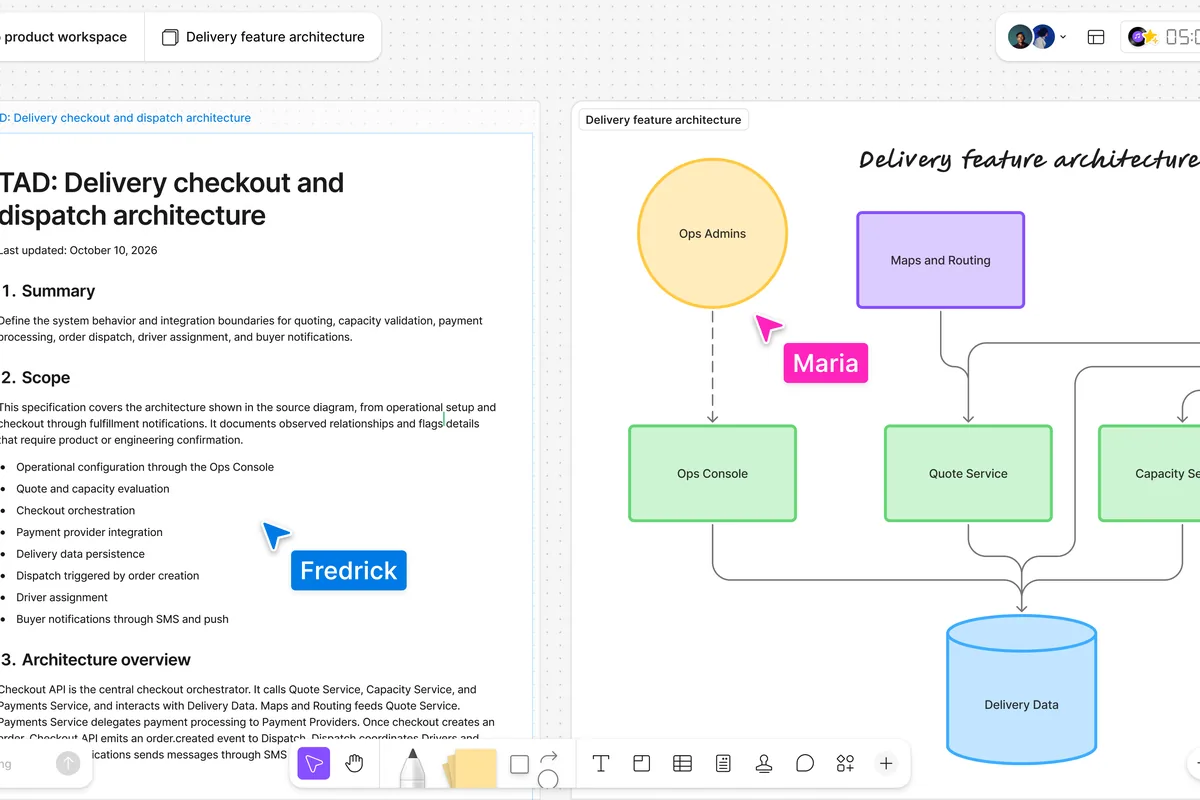
Figma 在 2026-10-15 推出 Specs:放在 Figma 或 FigJam 画布上的多人 Markdown。可以把现成的 .md 拖进画布,也可以按 D 或点工具栏的 Specs 图标新建;帮助中心还写了独立 Spec 文件,文件浏览器里选 Spec,或打开 figma.com/spec/new。说明里能嵌画布上的画框、FigJam 或节点,文字和设计放在一起。接上 Figma MCP 的编程助手用 figma-spec 技能读写这些 Spec。博客写从当天起向付费方案开放测试;帮助中心写 Professional、Education、Organization、Enterprise,且需要对文件有编辑权,并写功能会在接下来几周陆续出现。用助手改 Spec 会计入 Figma 的 AI 额度,自己直接写字不计。这和库里的 figma-agent-ga 不是同一条:那条是 10 月 6 日设计助手正式版,这条是画布上的说明容器。适合想把设计说明写在稿子旁边、让编程助手按同一份 Spec 干活的人。本库没有付费工作区,没有打开 Spec,也没有接 MCP。 On 2026-10-15 Figma launched Specs: multiplayer Markdown on the Figma or FigJam canvas. Drop a .md file onto the canvas, or press D / click the Specs icon; the help center also describes a standalone Spec file from the file browser or figma.com/spec/new. A spec can embed a frame, a FigJam file, or a canvas node, so the writing sits next to the design. Coding agents on the Figma MCP server read and write Specs with the figma-spec skill. The blog says open beta on paid plans starting that day; the help center lists Professional, Education, Organization, and Enterprise, requires edit access, and says the feature rolls out over the following weeks. Using the agent on a Spec spends Figma AI credits; typing in the spec yourself does not. This is not the in-library figma-agent-ga entry, which is the 6 October design-agent launch; this one is the on-canvas spec container. Good when the brief should live beside the frames and the coding agent should follow that same Spec. This library has no paid workspace, did not open a Spec, and did not connect MCP.

为什么推荐Why we recommend it 付费方案开放测试;本库未在付费工作区实测 Specs/MCP。博客写付费方案,帮助中心另列 Education,两套范围都保留。 Open beta on paid plans; this library did not try Specs or MCP in a paid workspace. The blog says paid plans and the help center also lists Education; both scopes stay.

核验记录:来源、抓取与截图说明Verification log: sources, checks, and captures

2026-10-15 晚间:博客与帮助中心均 HTTP 200。博客日期 October 15, 2026,作者 Luke Zhang、Johnny Dallas、Aosheng Ran。拖放 .md、按 D、Figma MCP 与 figma-spec 技能、AI 额度与「直接编辑不计额度」均照博客和帮助中心。帮助中心写 Professional、Education、Organization、Enterprise,需编辑权,并写接下来几周陆续开放。预览为博客配图(画布上的 Spec 与旁边的架构图)裁 3:2 WebP(1200×800),不是本库登录后的实拍。与 figma-agent-ga(发布说明,2026-10-06)源地址不同。2026-10-15 evening: blog and help center both HTTP 200. Blog date October 15, 2026; authors Luke Zhang, Johnny Dallas, Aosheng Ran. Drag-and-drop .md, the D shortcut, Figma MCP plus the figma-spec skill, and AI-credit vs direct-edit wording follow the blog and help center. The help center lists Professional, Education, Organization, and Enterprise, requires edit access, and says access rolls out over the following weeks. Preview is a blog figure (a Spec beside an architecture diagram) cropped to a 3:2 WebP (1200×800), not a capture from a signed-in file. Different source URL from figma-agent-ga (release notes, 2026-10-06).
上手路径How to start

审批边界Approval boundary

让助手改 Spec 或按 Spec 写代码前,先确认席位和 AI 额度。本库没有代为登录。 Check the seat and AI credits before an agent edits a Spec or implements it. This library did not sign in.

  1. 先跑一次安全范围Run a safe first pass

    先在可撤回、不外发的范围内试跑。本条未批准前:让助手改 Spec 或按 Spec 写代码前,先确认席位和 AI 额度。本库没有代为登录。。 Try it first in a reversible, non-outbound scope. Until approved: Check the seat and AI credits before an agent edits a Spec or implements it. This library did not sign in..

  2. 存 SkillSave a Skill

    这条用法已包含可复用 Skill。跑通安全范围后,立刻把步骤固化下来。 This use already includes a reusable Skill. After the safe pass, lock the steps in.

  3. 再上 RoutineThen add a Routine

    确认输出可靠后,再考虑定时或事件触发;例行默认仍应停在待审。 After output is reliable, consider a schedule or event trigger. Routines should still stop at review by default.

相关案例Related cases