详细介绍Details
ArtCraft 团队用 Rust 从零重写了七款对标 Adobe 的创作软件:修图 PhotoCraft(对标 Photoshop)、矢量插画 VectorCraft(Illustrator)、剪视频 FilmCraft(Premiere Pro)、照片管理和 RAW 冲印 LightCraft(Lightroom)、PDF 工具 PrintCraft(Acrobat)、动效特效 EffectCraft(After Effects)、排版 DesignCraft(InDesign)。全部免费开源,Mac、Windows、Linux 都有安装包。跟 AI 最相关的是:每个应用都带命令行和 MCP 服务器,Claude 这类 AI 助手可以直接打开文件、调参数、导出,不用靠截图点鼠标。现在都还很早期,官方自己说 PhotoCraft 还替代不了日常专业工作。这是一条工具笔记:本库没有下载安装,也没有让 AI 助手实际操作过。 The ArtCraft team rewrote seven Adobe-style creative apps from scratch in Rust: PhotoCraft for image editing (like Photoshop), VectorCraft for vector illustration (Illustrator), FilmCraft for video editing (Premiere Pro), LightCraft for photo library and raw development (Lightroom), PrintCraft for PDFs (Acrobat), EffectCraft for motion graphics and effects (After Effects), and DesignCraft for page layout (InDesign). All are free and open source, with installers for macOS, Windows, and Linux. The AI angle: every app ships a command-line tool and an MCP server, so an agent like Claude can open files, set parameters, and export without clicking through screenshots. All of them are early; the team itself says PhotoCraft cannot yet replace daily professional work. This is a tool tip. This library did not install any of them or let an agent drive one.
它是什么What it is
ArtCraft 本来是做 AI 出图出视频的团队,这次另开了一套叫 Crafting Apps 的开源软件:七款应用分别对应 Adobe 的 Photoshop、Illustrator、Premiere Pro、Lightroom、Acrobat、After Effects 和 InDesign,界面、快捷键和菜单都照着设计师已经熟悉的习惯来,全部用 Rust 从零写成,文件都在你自己电脑上处理。对 AI 来说,最有用的是每个应用里的每个按钮都是一条命令:界面、命令行和 MCP 服务器调的是同一套命令。所以你可以让 Claude、Cursor 这类助手直接修图、批量调色、拆合 PDF、排版,而不是让它看截图去点。适合想试 Adobe 免费替代品的设计师,以及想让 AI 助手直接动手处理图片、PDF、视频的人。 ArtCraft is a team that makes an AI image and video studio. Crafting Apps is a separate set of open-source apps: seven of them, matching Adobe’s Photoshop, Illustrator, Premiere Pro, Lightroom, Acrobat, After Effects, and InDesign. Layouts, shortcuts, and menus follow habits designers already have. Every app is written from scratch in Rust, and your files are processed on your own machine. For AI, the useful part is that every button in each app is a command, and the UI, the command line, and the MCP server all call the same commands. So an agent like Claude or Cursor can retouch images, batch-grade photos, split and merge PDFs, or lay out pages directly, instead of reading screenshots and clicking. It suits designers who want to try a free Adobe alternative, and anyone who wants an AI agent to work on images, PDFs, and video hands-on.
为什么推荐Why we recommend it 帖子说法偏夸张,本条以官方来源为准。七个仓库都在 GitHub 组织 storytold 下(ArtCraft 主仓库 storytold/artcraft 也在此,官网页脚写 hello@storyteller.ai),各自 README 都写 clean-room(只依据公开规范和观察到的行为实现,不含 Adobe 代码或素材)、MIT 或 Apache-2.0 双许可,并写明与 Adobe 无关联。官网状态标签:PhotoCraft、PrintCraft 为 Early alpha,其余为 In development。PhotoCraft README:500+ 条命令同时供界面、CLI、JSON 控制通道和 MCP 使用;`photocraft-cli mcp` 可无界面运行,也可桥接到正在运行的应用;docs/control-protocol.md 写桥接只监听本机回环地址并要令牌,文件读写范围用 --automation-read-root / --automation-write-root 限定。PrintCraft README 写 MCP 默认不启动、不开网络端口,只在助手启动 printcraft-cli mcp 时经 stdin/stdout 运行。PhotoCraft README 状态段原话大意:还不是日常专业工作的 Photoshop 替代品,最大缺口是 AI/生成式功能、约二十个工具、排版深度和插件兼容。PSD:官网写 135 个真实文件里 134 个逐字节往返;README 更细:psd-tools 测试集 309 个文件里 307 个打开再保存后渲染一致,重新保存的文件并非逐字节相同,只有独立的 photocraft-psd 库能逐字节还原。两处口径不同,本条按 README。组织里 10-07 还新建了 gridcraft(Excel)、cadcraft(AutoCAD)、deckcraft(PowerPoint)、soundcraft(Pro Tools),不在官网七款之列,本条不收。本库未下载、未安装、未从源码编译、未接 MCP。 The post overstates things, so this entry follows the official sources. All seven repos live in the GitHub org storytold (alongside the main ArtCraft repo storytold/artcraft; the site footer lists hello@storyteller.ai). Each README says clean-room (built from public specs and observed behaviour only, no Adobe code or assets), dual MIT or Apache-2.0, and not affiliated with Adobe. Site status labels: PhotoCraft and PrintCraft are Early alpha, the rest In development. PhotoCraft README: 500+ commands shared by the UI, CLI, JSON control channel, and MCP; `photocraft-cli mcp` runs headless or bridges to the running app; docs/control-protocol.md says the bridge listens on loopback only and needs a token, and file access is limited with --automation-read-root / --automation-write-root. PrintCraft README says its MCP server never starts on its own, opens no network port, and runs over stdin/stdout only while an agent launches printcraft-cli mcp. PhotoCraft README status, paraphrased: not yet a Photoshop replacement for daily professional work; the biggest gaps are AI/generative features, about twenty tools, typography depth, and plug-in compatibility. PSD: the site says 134 of 135 real files round-trip byte for byte; the README is more specific — 307 of 309 psd-tools files render the same after open-and-save, a re-saved file is not byte-identical, and only the standalone photocraft-psd crate reproduces files byte for byte. The two differ; this entry follows the README. On 10-07 the org also created gridcraft (Excel), cadcraft (AutoCAD), deckcraft (PowerPoint), and soundcraft (Pro Tools); they are not among the site’s seven and are not covered here. This library did not download, install, build from source, or connect MCP.
核验记录:来源、抓取与截图说明Verification log: sources, checks, and captures
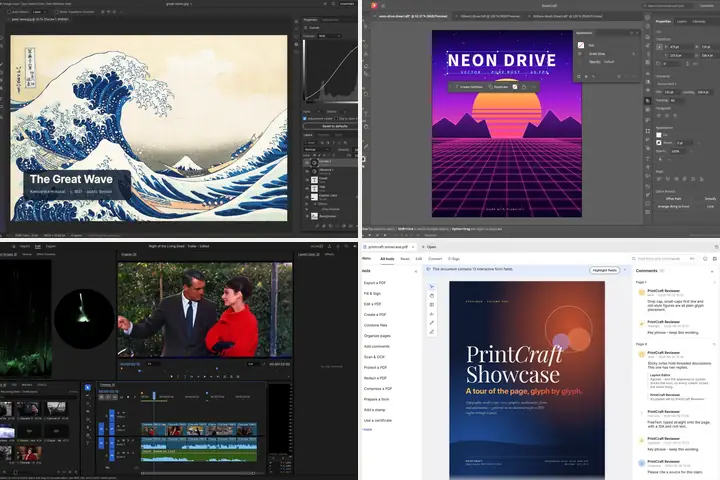
线索来自 X 帖 @math_fournity(2026-10-06T19:30:55Z / 北京时间 2026-10-07 03:30),原文「🚨 Adobe 天塌了,全套Adobe软件,开源实现」,附官网总览页截图,撰写时约 72 万浏览、9.7k 赞、1.1 万收藏。主源是 ArtCraft 官网总览页 https://getartcraft.com/apps(撰写时 HTTP 200,标题 Crafting Apps: open-source creative tools — ArtCraft),写的是七款应用、纯 Rust、开源免费,原则里列了「Agent-ready:CLI、JSON 控制通道或 MCP 服务器驱动每个应用」。gh api 撰写时 star 数:photocraft 约 11.7k、filmcraft 约 2.3k、lightcraft 约 1.8k、printcraft 约 1.6k、vectorcraft 约 1.5k、effectcraft 约 1.1k、designcraft 约 0.7k;仓库建于 2026-09-30 至 10-01(UTC),最早的正式发布是 photocraft 2026-10-02T00:09Z,其余六个 2026-10-02T22:31Z 左右。撰写时 PhotoCraft 最新 v0.3.0(2026-10-07T10:33Z),官网下载区仍显示 0.2.0。预览为官网四款应用官方截图(PhotoCraft / VectorCraft / FilmCraft / PrintCraft)拼成 3:2 WebP。不打星。Lead: X post by @math_fournity (2026-10-06T19:30:55Z / 03:30 on 2026-10-07 Beijing time), text “🚨 Adobe is done for — the whole Adobe suite, open-source,” with a screenshot of the official overview page; about 724k views, 9.7k likes, and 11k bookmarks at write time. Primary source is the ArtCraft overview page https://getartcraft.com/apps (HTTP 200 at write time, title Crafting Apps: open-source creative tools — ArtCraft): seven apps, pure Rust, open source and free, and an “Agent-ready” principle — drive every app from a CLI, a JSON control channel, or an MCP server. Stars via gh api at write time: photocraft about 11.7k, filmcraft about 2.3k, lightcraft about 1.8k, printcraft about 1.6k, vectorcraft about 1.5k, effectcraft about 1.1k, designcraft about 0.7k. Repos were created 2026-09-30 to 10-01 (UTC); the first release was photocraft at 2026-10-02T00:09Z, the other six around 2026-10-02T22:31Z. At write time PhotoCraft’s latest is v0.3.0 (2026-10-07T10:33Z) while the site’s download area still shows 0.2.0. Preview is a 3:2 WebP collage of four official app screenshots from the site (PhotoCraft / VectorCraft / FilmCraft / PrintCraft). Unrated.