详细介绍Details
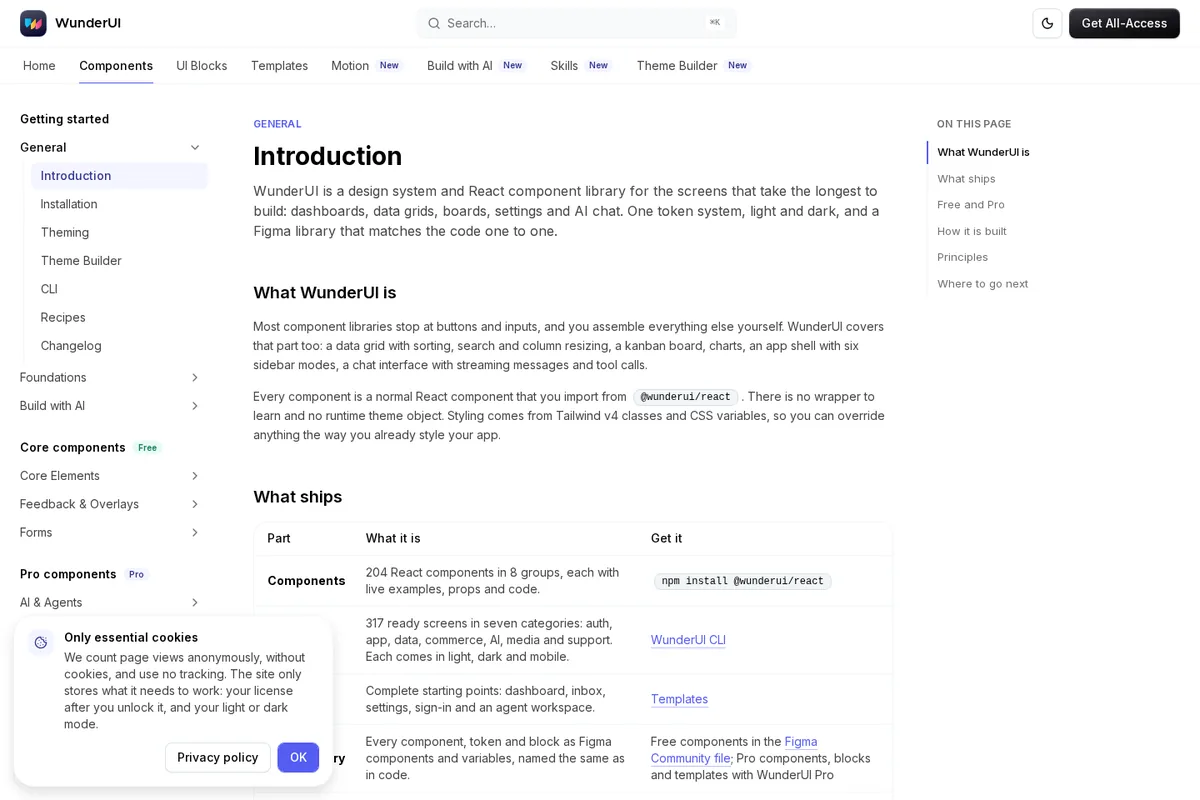
WunderUI 是面向后台、看板、设置页和 AI 聊天界面的设计系统:文档写有 204 个 React 组件、与代码同名的 Figma 库、以及给编程助手用的 MCP、DESIGN.md、design.json 和 llms.txt。免费档约 80 个 Core 组件 MIT 开源(GitHub wunder-ui/wunderui);Pro 才解锁图表、AI & Agents、UI Blocks 等。Build with AI 页写 MCP 可本地跑、读库存无需密钥;`claude mcp add wunderui -- npx -y wunderui-mcp`。Agent 上下文四件套免费可读。适合已经在用 Cursor / Claude Code、又想助手按真实设计系统出界面的团队。 WunderUI is a design system aimed at dashboards, boards, settings, and AI chat UIs: docs list 204 React components, a Figma library named like the code, plus MCP, DESIGN.md, design.json, and llms.txt for coding agents. About 80 Core components are MIT on GitHub (wunder-ui/wunderui); Pro unlocks charts, AI & Agents, UI Blocks, and more. The Build with AI page says the MCP server runs locally with no key to read the inventory (`claude mcp add wunderui -- npx -y wunderui-mcp`). The four agent-context artifacts are free to read. Good for teams on Cursor / Claude Code who want agents to build against a real design system.
为什么推荐Why we recommend it 收录理由:AI×设计,组件库 + Figma + 给 Agent 的可读上下文,和库里 Framer Skills、Oil UI 一类「让助手跟设计系统走」同向。本库没有 npm install,没有连 MCP,没有买 Pro,也没有在 Figma 里打开社区文件。 Why listed: AI×design—component library + matching Figma + agent-readable context—same direction as Framer Skills and Oil UI. This library did not npm install, connect MCP, buy Pro, or open the Figma Community file.
核验记录:来源、抓取与截图说明Verification log: sources, checks, and captures
主源是 https://wunderui.com/introduction 与 https://wunderui.com/agents ,早间 HTTP 200;组件数量、Free/Pro 分界、MCP 与 DESIGN.md / llms.txt 照文档写。GitHub https://github.com/wunder-ui/wunderui 早间可见,MIT,星很少(收录时约 1)。预览为 Playwright 实拍 Introduction 页裁 3:2 WebP。Primary sources are https://wunderui.com/introduction and https://wunderui.com/agents, HTTP 200 this morning; component counts, Free/Pro split, MCP, and DESIGN.md / llms.txt follow the docs. GitHub https://github.com/wunder-ui/wunderui is reachable (MIT, very few stars at catalog time, about 1). Preview is a Playwright capture of the Introduction page, cropped to 3:2 WebP.
上手路径How to start
审批边界Approval boundary 免费 Core 可直接试;用到 Pro 组件、Blocks 或付费 Skills 前先确认许可证。 Free Core is fine to try; confirm the license before using Pro components, Blocks, or paid Skills.
- 先跑一次安全范围Run a safe first pass
先在可撤回、不外发的范围内试跑。本条未批准前:免费 Core 可直接试;用到 Pro 组件、Blocks 或付费 Skills 前先确认许可证。。 Try it first in a reversible, non-outbound scope. Until approved: Free Core is fine to try; confirm the license before using Pro components, Blocks, or paid Skills..
- 存 SkillSave a Skill
这条用法已包含可复用 Skill。跑通安全范围后,立刻把步骤固化下来。 This use already includes a reusable Skill. After the safe pass, lock the steps in.
- 再上 RoutineThen add a Routine
确认输出可靠后,再考虑定时或事件触发;例行默认仍应停在待审。 After output is reliable, consider a schedule or event trigger. Routines should still stop at review by default.