详细介绍Details
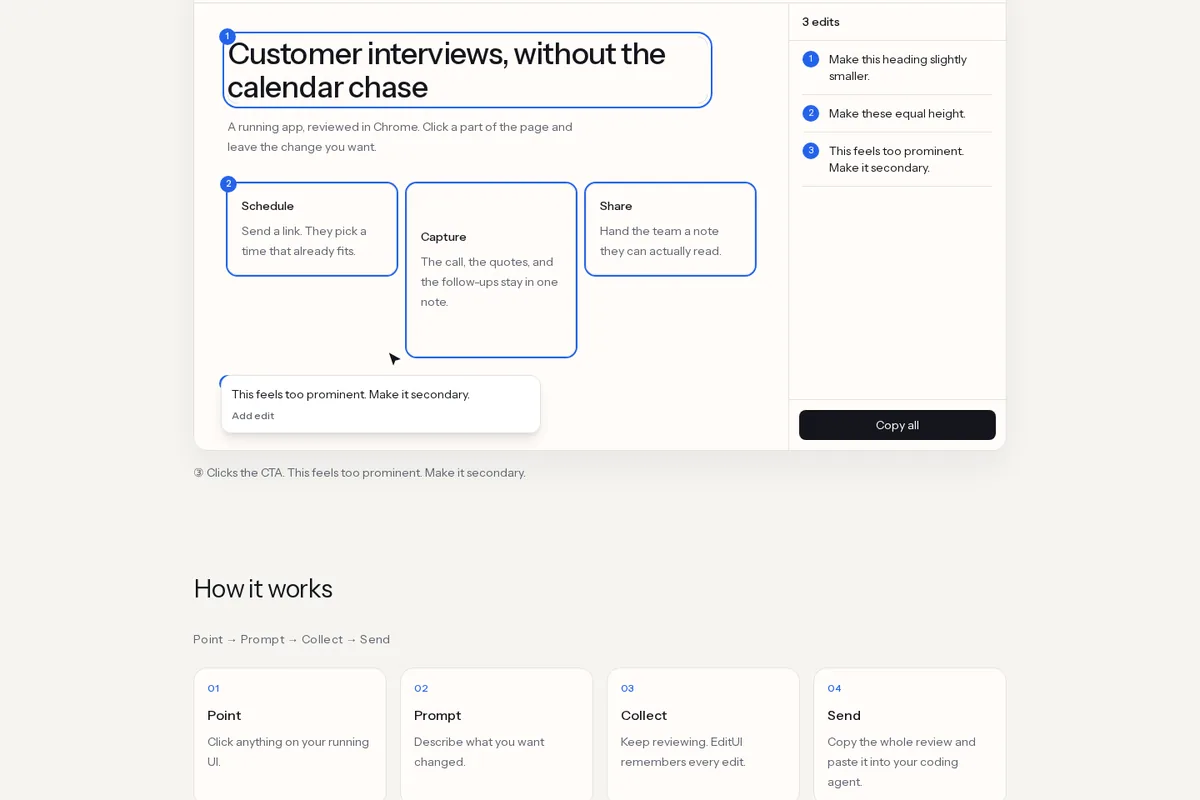
EditUI 是免费的 Chrome 扩展(MIT 开源):打开正在跑的页面(含 localhost),开编辑模式后点元素、写下想改成什么样,可以连点多处,最后「Copy all」生成一份带 URL、视口、DOM 上下文和你的备注的提示词,粘贴进 Claude Code、Cursor、Codex 或任意能吃粘贴的助手。它不直接改代码、不接 MCP、不替你调模型,只负责把「你指的是哪一块」说清楚。官网写 Free、不用账号、不用先配仓库。适合做界面走查、又懒得口头描述「左上角那个按钮」的人。 EditUI is a free Chrome extension (MIT): open a running page (localhost included), turn on edit mode, click elements and write the change you want, collect several notes, then Copy all builds one prompt with URL, viewport, DOM context, and your notes for Claude Code, Cursor, Codex, or any paste-friendly agent. It does not edit code, speak MCP, or call a model—it only makes “which element” unambiguous. The site says free, no account, no repo setup. Good for UI review when you are tired of describing “the button at the top left.”
为什么推荐Why we recommend it 点选→备注→Copy all、agent-agnostic、不直接改代码,都照官网与扩展说明页写;结构化数据标价 0 USD。Chrome Web Store 链接来自官网 CTA。本库没有安装扩展、没有在 localhost 实测走查。 Click→note→Copy all, agent-agnostic paste, and no direct code edits follow the site and extension page; structured data lists price 0 USD. Chrome Web Store link is from the site CTA. This library did not install the extension or run a localhost review.
核验记录:来源、抓取与截图说明Verification log: sources, checks, and captures
主源官网 https://www.editui.app/ 与仓库 junetic/editui;晚间 HTTP 200,gh api:MIT、3★,2026-09-29 创建,最近推送 2026-10-11。预览为 Playwright 实拍官网 Demo 区,裁 3:2 WebP 自托管。Primary sources are https://www.editui.app/ and junetic/editui; HTTP 200 this evening; gh api: MIT, 3★, created 2026-09-29, last push 2026-10-11. Preview is a Playwright capture of the home Demo, cropped to a self-hosted 3:2 WebP.