社区 Community 需审批 Needs approval
Onesie — 给 System One 模型用的 Unix 风格 CLI Onesie — a Unix-style CLI for System One models
Onesie — a Unix-style CLI for System One models
用命令行调用 System One 模型。 Use System One models from the command line.
Onesie — a Unix-style CLI for System One models
用命令行调用 System One 模型。 Use System One models from the command line.
Show HN https://github.com/frodi-karlsson/onesie — 作者帖标题写 Unix-style CLI for System One models like Jev。描述为 “Possibly the most robust System One CLI”。README:把文本和问题送进管道,得到可脚本化的概率、--pick 或 --rate;shell-safety 用退出码做门(0 放行、1 拦住、7 交给人)。安装有 brew、install.sh、go install,然后 onesie auth set;也可先加 Claude Code 插件。onesie calibrate 用你已标注的数据看阈值会抓住什么、误报什么;ONESIE_MOCK 用文件假答,方便测脚本。对话对象是 TypeSafe 的 Jev(直连或 OpenRouter)或 Berget 的 System One 模型。本条是工具笔记,不替你安装,也不替你把密钥或工单打到模型上。 description “Possibly the most robust System One CLI.” README: pipe text plus a question and get a scriptable probability, --pick, or --rate; shell-safety uses exit codes as a gate (0 run, 1 block, 7 ask a person). Install via brew, install.sh, or go install, then onesie auth set; a Claude Code plugin can come first. onesie calibrate shows what each cut catches and falsely flags on data you have already labelled; ONESIE_MOCK answers from a file so a script can be tested. It talks to TypeSafe’s Jev (direct or via OpenRouter) or Berget’s System One models. This is a tool tip — it does not install the CLI for you, and it does not send keys or tickets to a model for you.
Onesie 是一个 MIT 开源的命令行(作者自述:给 System One 模型用的 Unix 风格 CLI,仓库描述写 “Possibly the most robust System One CLI”)。用法是管道:左边是文本,右边是一个是否题、一组 --pick 选项,或一条 --rate 刻度,stdout 上拿到可以接着脚本化的答案。README 还写了内置问题集(shell-safety、prompt-injection、personal-data、moderation,作者称已校准)、onesie calibrate(用你自己标过的数据看某个切分会抓住什么、误报什么)、以及 ONESIE_MOCK / --print-request 这种不打网的试法。它对话的是 TypeSafe 的 Jev(直连或 OpenRouter)或 Berget 的 System One,不是本站的 Grok Bot。Show HN item 49876472。本站收成「工具笔记」。 Onesie is an MIT command-line tool (author framing: a Unix-style CLI for System One models; the repo description says “Possibly the most robust System One CLI”). The shape is a pipe: text on the left, a yes/no question, a --pick list, or a --rate scale on the right, and a scriptable answer on stdout. The README also describes built-in question sets (shell-safety, prompt-injection, personal-data, moderation — the author says they are calibrated), onesie calibrate (what a cut catches and falsely flags on data you already labelled), and offline trials via ONESIE_MOCK / --print-request. It talks to TypeSafe’s Jev (direct or through OpenRouter) or Berget’s System One models — not this site’s Grok Bot. Show HN item 49876472. Listed here as a tool tip.
为什么推荐Why we recommend it 收录理由:把已在 Models 的 Jev / System One 收成可管道化的 CLI,退出码和校准命令都能在 README 对上。README 里的 AUC / 命中率是作者示例输出,本库未复跑。不要把密钥、工单原文或生产命令管道进模型,也不要只靠模型门禁当安全边界。本站未代装、未代跑。 Listing rationale: a pipeable CLI next to Jev / System One already on the Models board; exit codes and the calibrate command are checkable in the README. AUC / catch rates in the README are the author’s example output, not re-run here. Do not pipe secrets, raw tickets, or production commands into the model, and do not treat the model gate as a security boundary by itself. This site did not install or run it.
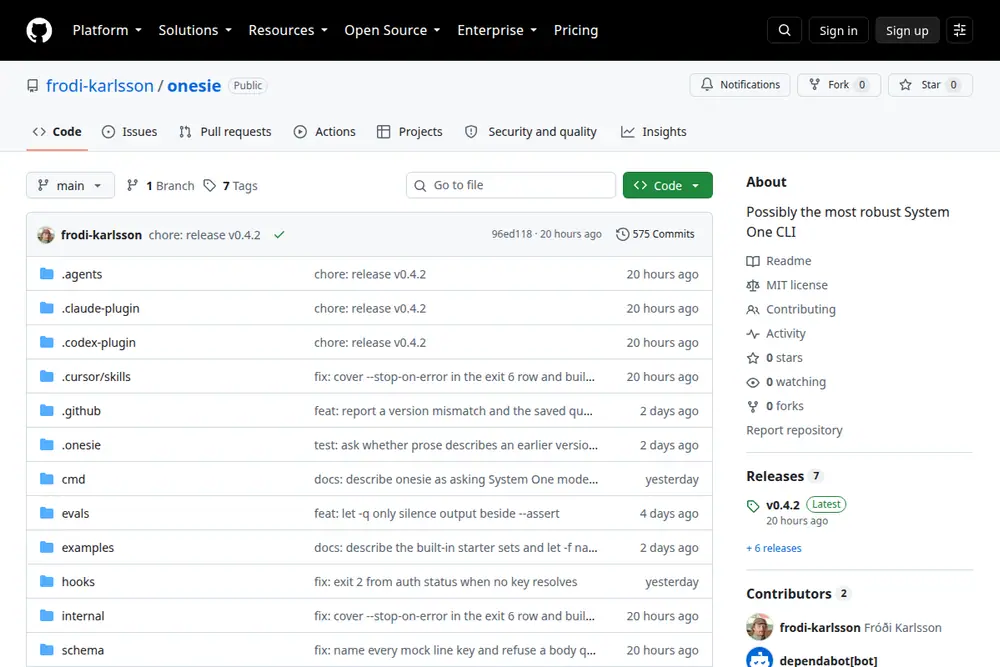
主源是 Show HN 49876472 与 MIT 仓库。边界:0★(2026-09-28 gh api,不虚构星数);需要 TypeSafe / OpenRouter / Berget 的密钥,除非走 --print-request 或 ONESIE_MOCK。预览 Playwright 实拍 GitHub README 首屏 3:2。不打星。 (item 49876472,2026-09-28T11:37:25Z / 约 19:37 CST,Algolia 核对 2pts) 仓库 frodi-karlsson/onesie 于 2026-09-28 gh api:MIT、0★; 仓库 HTTP 200。Primary sources are Show HN 49876472 and the MIT repo. Boundary: 0★ on the 2026-09-28 gh api (stars are not invented); a TypeSafe / OpenRouter / Berget key is required unless you use --print-request or ONESIE_MOCK. Preview is a Playwright 3:2 capture of the GitHub README above the fold. Unrated. (2026-09-28T11:37:25Z / about 19:37 CST, 2pts on Algolia at check time) Show HN item 49876472 at https://github.com/frodi-karlsson/onesie — the post title calls it a Unix-style CLI for System One models like Jev. Repo frodi-karlsson/onesie on the 2026-09-28 gh api: MIT, 0★; Repo HTTP 200.
左列是 README / Show HN 对得上的事实。右列说明为什么放在 Cases 工具笔记,以及不要把它当成已经替你守住安全边界。 Left column: what the README / Show HN actually say. Right column: why it sits as a Cases tool tip, and why it has not already secured a boundary for you.
Onesie Onesie
Unix 风格 CLI:管道里问 System One 模型,输出概率、选项或刻度,退出码可被脚本接住。 A Unix-style CLI: ask a System One model from a pipe, print a probability, a pick, or a rate, and let a script read the exit code.
对照本站口径 This library’s framing
本站 Cases 的「AI tool tip」。相邻于已收录的 Jev / Laya,不是 xAI、TypeSafe 或 Berget 的官方客户端。 An AI tool tip in Cases. Adjacent to catalogued Jev / Laya — not an official xAI, TypeSafe, or Berget client.
Onesie Onesie
README:默认 TypeSafe;--provider openrouter 或 --provider berget。onesie auth set 存密钥。 README: TypeSafe by default; --provider openrouter or --provider berget. onesie auth set stores a key.
对照本站口径 This library’s framing
本站未代填密钥,也未向这些 API 发请求。没有密钥时只用作者写的 dry-run / mock。 This site did not enter a key or send requests to those APIs. Without a key, stay on the author’s dry-run / mock paths.
Onesie Onesie
README:shell-safety 一类问题用退出码表示放行、拦住或交给人。calibrate 的表是作者用已标注样本跑出来的示例。 README: questions such as shell-safety use exit codes for run, block, or ask a person. The calibrate table is the author’s example on labelled samples.
对照本站口径 This library’s framing
概率和退出码不是审计结论。密钥、生产命令、未脱敏日志不要送进去。 A probability and an exit code are not an audit. Do not send keys, production commands, or unredacted logs.
打开 GitHub README 与 HN item 49876472,确认 MIT、0★、以及它问的是 System One(Jev / Berget),不是通用聊天补全。 Open the GitHub README and HN item 49876472. Confirm MIT, 0★, and that it asks System One models (Jev / Berget), not a general chat completion.
README:brew install frodi-karlsson/tap/onesie,或校验过的 install.sh,或 go install github.com/frodi-karlsson/onesie/cmd/onesie@latest。本站不代装。装好后先跑 --print-request 或 ONESIE_MOCK,确认脚本分支,再考虑 onesie auth set。 README: brew install frodi-karlsson/tap/onesie, the checksummed install.sh, or go install github.com/frodi-karlsson/onesie/cmd/onesie@latest. This site does not install it. After install, run --print-request or ONESIE_MOCK and check the script branch before onesie auth set.
onesie calibrate 需要你已经标好的记录。内置 shell-safety 的切分和误报表以 README 示例为准,本站未复跑。真要接到 shell 或工单流之前,先去掉密钥和未公开数据;退出码只是提示,生产命令仍要人点头。 onesie calibrate needs records you have already labelled. Cuts and false-alarm figures for the built-in shell-safety set follow the README example; they were not re-run here. Before wiring a shell or a ticket stream, strip keys and unpublished data. The exit code is a hint — production commands still need a person.
README:Thresholds from evidence README: Thresholds from evidence