社区 Community 需审批 Needs approval

Leftovers — 清理 coding agent 留在 Mac 上的进程与缓存 Leftovers — clean up processes and caches coding agents leave on a Mac

Leftovers — clean up processes and caches coding agents leave on a Mac

清理编程 Agent 遗留的进程与缓存。 Clean up processes and caches left by coding Agents.

Leftovers — 清理 coding agent 留在 Mac 上的进程与缓存 预览
打开原文Open source

详细介绍Details

Show HN https://github.com/arpwal/leftovers — MIT 免费 macOS 菜单栏应用:按 footprint(RAM+压缩+swap)找出 agent / 应用留下的 dev server、MCP、git worktree、LaunchAgent 与可重建缓存,安全清理。与 Grok Bot / Claude Code / Cursor Agent 等本机旁路相邻;本条是工具笔记,不替你在本机执行清理。 Adjacent to local Grok Bot / Claude Code / Cursor Agent workflows; this is a tool tip — it does not run cleanup on your machine for you.

它是什么What it is

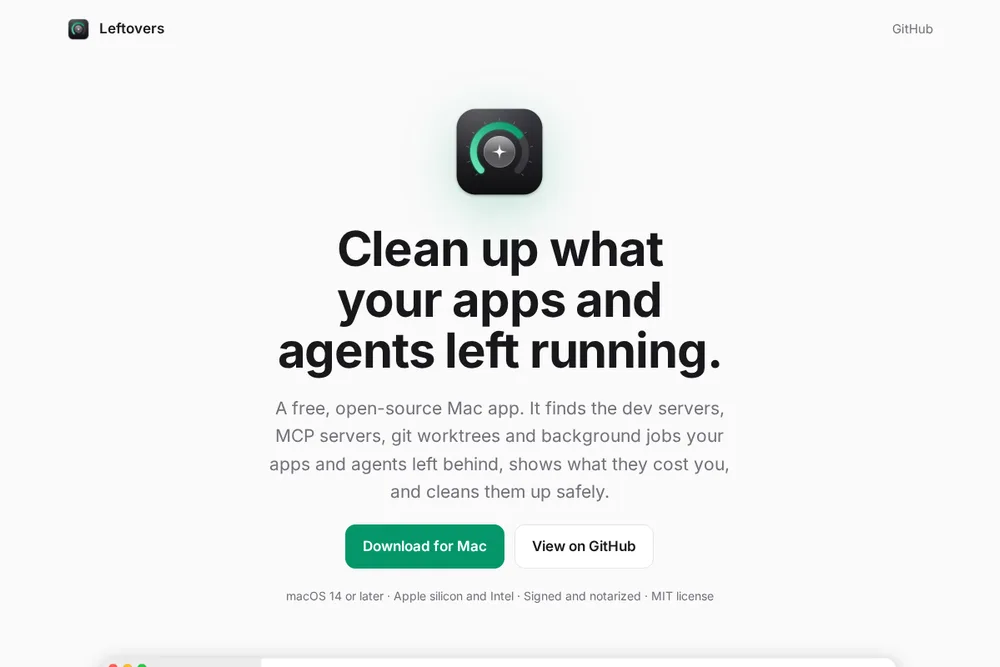
Leftovers 是开源 macOS 菜单栏工具(MIT)。README 写:coding agent 会话常留下 dev server、各自一份 MCP、git worktree 和定时任务;Activity Monitor 按内存排序时,已经换到 swap 的泄漏几乎看不见。Leftovers 读每个进程的 footprint(RAM + 压缩 + swap),列出 likely leaks、按 agent 会话归类的占用、可安全移除的 worktree(含 GitHub squash-merge 已合但本地还在的),以及可重建的开发者缓存(Xcode / npm / Docker 构建缓存等,不碰你的代码和数据库 volume)。也有 CLI:`leftovers --report` / `--json` / `--clean`。Show HN item 49861159。本站收成「工具笔记」:给跑本机 agent(含 Grok Bot 相邻栈)时清桌面用,不是云端 Bot 本身。 Leftovers is an open-source macOS menu-bar tool (MIT). The README says coding-agent sessions often leave behind dev servers, per-session MCP copies, git worktrees, and scheduled jobs; Activity Monitor sorts by RAM, so a leak already swapped out barely shows. Leftovers reads each process’s footprint (RAM + compressed + swap), lists likely leaks, memory by agent session, worktrees that are safe to remove (including ones squash-merged on GitHub that local git still keeps), and rebuildable developer caches (Xcode / npm / Docker build cache, and more — not your code or database volumes). CLI too: leftovers --report / --json / --clean. Show HN item 49861159. This library lists it as a tool tip for cleaning a local agent desk (including Grok Bot-adjacent stacks) — not the cloud Bot itself.

为什么推荐Why we recommend it 收录理由:agent 本机残留是真实痛点,菜单栏 + CLI 可核对。边界:只支持 macOS;清理动作不可逆,受保护进程会拒绝;本站未在你的 Mac 上安装或代清。 Listing rationale: leftover local agent processes are a real pain; menu bar + CLI are checkable. Boundary: macOS only; cleanup is irreversible and protected processes are refused; this site did not install or clean on your Mac.

核验记录:来源、抓取与截图说明Verification log: sources, checks, and captures

主源是 Show HN 49861159 与 MIT 仓库 / 文档站。星数仍低(核对 2★)。预览 Playwright 实拍文档首页 3:2。不打星。 (item 49861159,2026-09-26 ~22:27Z,Algolia 核对 2pts) 仓库 arpwal/leftovers 于 2026-09-28 gh api:MIT、2★; 文档站 https://arpwal.github.io/leftovers/ HTTP 200。Primary sources are Show HN 49861159 and the MIT repo / docs site. Star count is still low (2★ at check time). Preview is a Playwright 3:2 capture of the docs home. Unrated. (2026-09-26 ~22:27Z, 2pts on Algolia at check time) Show HN item 49861159 at https://github.com/arpwal/leftovers — MIT free macOS menu-bar app: finds leftover dev servers, MCP copies, git worktrees, LaunchAgents, and rebuildable caches by footprint (RAM + compressed + swap) and cleans them safely. Repo arpwal/leftovers on the 2026-09-28 gh api: MIT, 2★; docs site https://arpwal.github.io/leftovers/ HTTP 200.

对照Contrast

左列是 README / Show HN 对得上的事实。右列说明为什么放在 Cases 工具笔记,而不是当成「官方 Grok Bot 插件」。 Left column: what the README / Show HN actually say. Right column: why it sits as a Cases tool tip — not an official Grok Bot plugin.

Leftovers Leftovers 对照本站口径 This library’s framing

是什么 What it is

Leftovers Leftovers

macOS 菜单栏 + CLI:找 footprint 泄漏、agent 会话、worktree、可重建缓存并安全清理。 macOS menu bar + CLI: find footprint leaks, agent sessions, worktrees, rebuildable caches, and clean them safely.

对照本站口径 This library’s framing

本站 Cases 的「AI tool tip」;帮本机 agent 桌面减负,不是 xAI / Cursor 官方功能。 An AI tool tip in Cases — lightens a local agent desk; not an official xAI / Cursor feature.

平台 Platform

Leftovers Leftovers

README 与 Homebrew cask 面向 macOS;署名 notarized。 README and Homebrew cask target macOS; described as notarized.

对照本站口径 This library’s framing

Linux / Windows 不在本条范围;Grok Bot 云电脑上的残留也不由它管。 Linux / Windows are out of scope here; leftovers on a Grok Bot cloud computer are not what this app manages.

安全边界 Safety

Leftovers Leftovers

受保护进程拒绝退出;Docker volume 不提供删除;worktree 有未提交改动则 git 拒绝。 Protected processes refuse quit; Docker volumes are never offered for delete; git refuses worktrees with uncommitted work.

对照本站口径 This library’s framing

本站未代装、未代清。清理不可逆,点之前自己看列表。 This site did not install or clean for you. Cleanup is irreversible — read the list first.

怎么试Try it

  1. 打开文档与仓库 Open the docs and the repo

    先看 https://arpwal.github.io/leftovers/ 与 GitHub README,确认 MIT、macOS、footprint / agents / worktrees / caches 几块对得上你的痛点。 Read https://arpwal.github.io/leftovers/ and the GitHub README first; confirm MIT, macOS, and the footprint / agents / worktrees / caches sections match your pain.

  2. 按作者方式安装 Install the author’s way

    README:拖进 Applications,或 `brew install --cask arpwal/tap/leftovers`。本站不代装。装好后先看 Overview / Likely Leaks,别一上来 --clean。 README: drag into Applications, or brew install --cask arpwal/tap/leftovers. This site does not install it. After install, read Overview / Likely Leaks before any --clean.

  3. 只清你看得懂的项 Clean only what you understand

    优先 likely leaks 与已合并且无改动的 worktree;缓存类只清作者标明可重建的。生产目录、未提交 worktree、Docker volume 别碰。 Prefer likely leaks and already-merged worktrees with no local changes; only clear caches the author marks rebuildable. Leave production folders, dirty worktrees, and Docker volumes alone.

边界Boundaries

  • MIT 开源,但星数仍低(2026-09-28 核对 2★);功能以当日 README 为准。 MIT open source, but stars are still low (2★ on 2026-09-28 check); features follow that day’s README.
  • 只覆盖 macOS。不是 Grok Bot 官方组件,也不清理云端电脑。 macOS only. Not an official Grok Bot component, and it does not clean a cloud computer.
  • 本站未在读者机器上安装或执行清理;误杀进程 / 删缓存的风险由读者承担。 This site did not install or run cleanup on the reader’s machine; the reader owns the risk of quitting the wrong process or deleting a cache.

相关案例Related cases