详细介绍Details
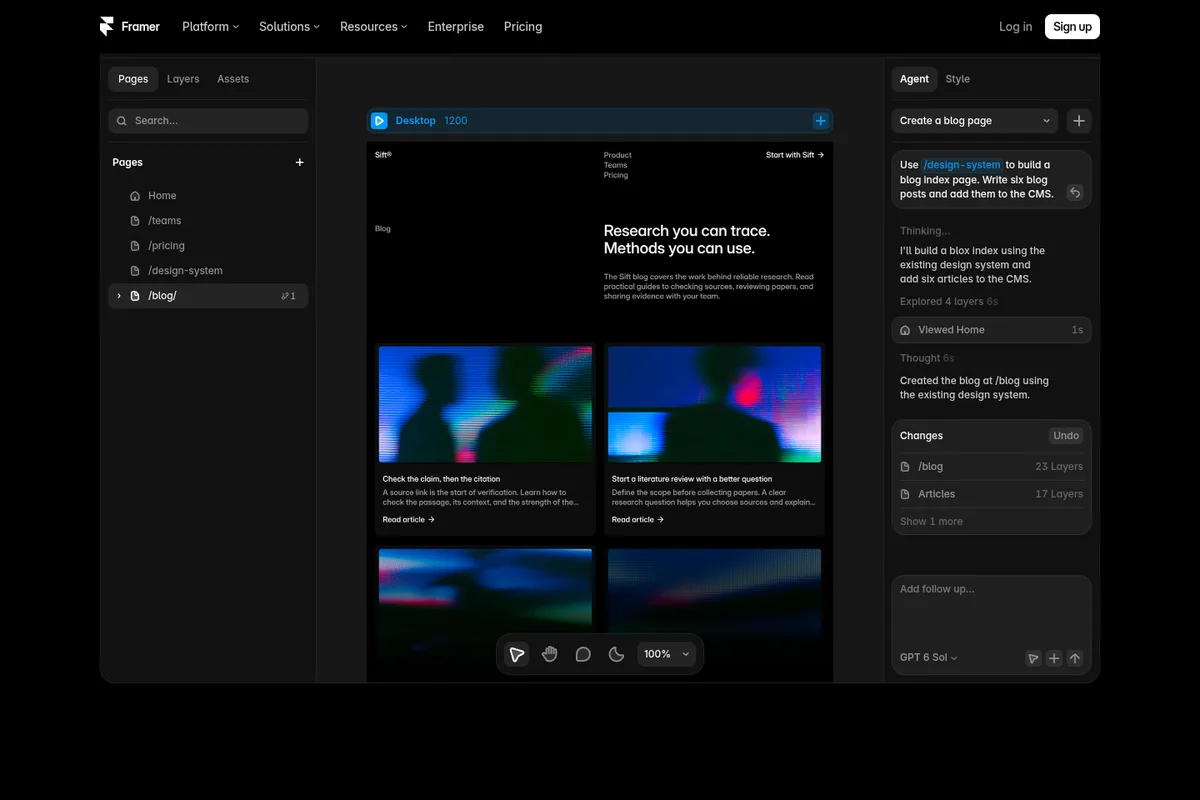
Framer 2026-09-22 上线 Skills(技能):把你做设计的规矩存成一段说明,以后让 Framer 自带的 AI 助手做事时直接调用。2026-10-07 官方又发了一条玩法:先把现有项目整理成一套可复用的设计规范,再写一条技能,之后用 /design-system 让助手做新页面,它会沿用项目里的字体、颜色、间距、版式和组件。官方页给了一条完整示例:只用深色、不许自己发明新颜色和字号、正文每行 50 到 75 个字符、唯一的强调色每段最多用一次。还附了几条可以直接复制的技能:品牌语气、去 AI 腔(删掉空话套话)、SEO 检查、上线前检查。用法:在助手对话框里输入 /skills 粘贴,之后用 /技能名 调用,在设置里能改。项目被别人 remix 时技能会跟着走,所以模板作者也能把「怎么加新页面」写进去。 Framer launched Skills on 2026-09-22: save the rules of how you design as instructions, then have Framer's built-in agent apply them. On 2026-10-07 Framer posted a how-to: first turn an existing project into a reusable design system, then write a Skill, and use /design-system to have the agent build new pages that reuse the project's typography, colors, spacing, layouts, and components. The official page shows a full example: dark scheme only, never invent new colors or text styles, 50–75 characters per line of body text, and the single accent color at most once per section. It also offers copy-paste Skills for brand voice, removing AI writing (cutting filler and vague claims), SEO checks, and a pre-launch check. To use one, type /skills in the agent chat and paste it, then call it with /skill-name; edit it in Settings. Skills travel with a project when someone remixes it, so template makers can ship guidance for adding pages too.
为什么推荐Why we recommend it 收录理由:本库之前没有 Framer,这条是「设计规范交给 AI 照做」的 AI×设计做法,和库里的 Graphical、figma-use 思路相近,但直接在 Framer 画布里用。本库没有登录 Framer,没有实际写技能、做页面,也没有核对哪些套餐能用 Skills。演示页里的模型选择显示 GPT 6 Sol,只是页面截图里的字样。 Why it is listed: the library had no Framer entry, and this is an AI×design pattern of handing your design system to an agent, close to Graphical and figma-use already in the library but used directly on the Framer canvas. This library did not sign in to Framer, write a Skill, or build a page, and did not check which plans include Skills. The model picker in the demo shows GPT 6 Sol; that is only text in the page's demo.
核验记录:来源、抓取与截图说明Verification log: sources, checks, and captures
主源是 Framer 官方 Skills 页 https://www.framer.com/skills ,晚间 HTTP 200,示例规则(深色、不新增颜色和字号、每行 50–75 字符目标 65、强调色每段最多一次)和四条可复制技能都照页面写。上线日期取更新日志 https://www.framer.com/updates/skills 的 Published September 22, 2026。新的玩法帖是 @framer 2026-10-07T22:34Z(约 10-08 06:34 北京时间),晚间约 4900 次浏览,附演示视频。预览为 Playwright 实拍 Skills 页演示区裁 3:2 WebP。Primary source is Framer's official Skills page https://www.framer.com/skills, HTTP 200 this evening; the example rules (dark scheme, no new colors or text styles, 50–75 characters per line targeting 65, accent at most once per section) and the four copy-paste Skills are as the page states. The launch date comes from the changelog https://www.framer.com/updates/skills, Published September 22, 2026. The new how-to post is @framer at 2026-10-07T22:34Z (about 06:34 on 10-08 Beijing time), about 4,900 views this evening, with a demo video. Preview is a Playwright capture of the Skills page demo area, cropped to 3:2 WebP.