工具页 Tool library library 动效 Motion

Prompt Motion:200 多条 Claude 做的动效视频,每条都附上做它的提示词 Prompt Motion: 200+ motion videos made with Claude, each with the prompt behind it

200 多条 AI 动效片,每条旁边都摆着做它的提示词。 200+ AI motion videos, each shown next to the prompt that made it.
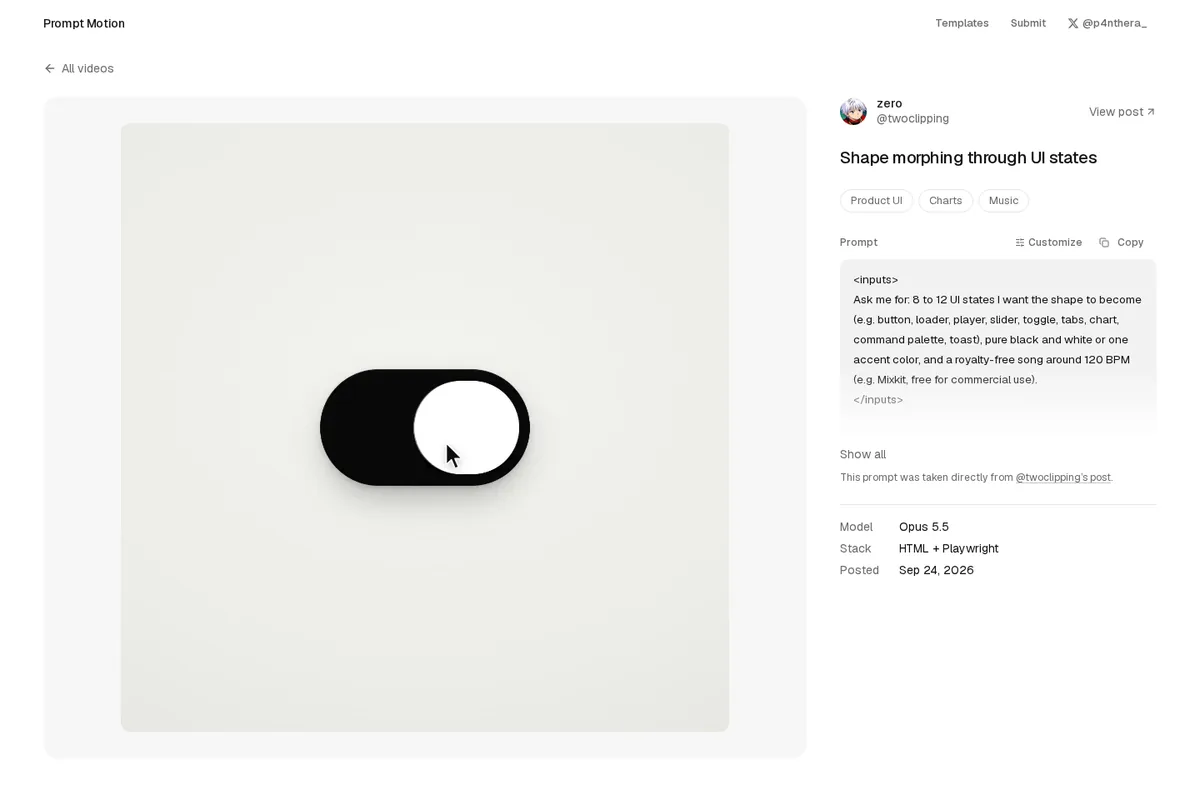
Prompt Motion:200 多条 Claude 做的动效视频,每条都附上做它的提示词 预览

详细介绍Details

一个收集「用 AI 做动效视频」的网站:作者 @p4nthera_ 把 X 上大家用 Claude Opus 5.5 做出来的动效片整理到一起,每条视频旁边都放着做出它的那段提示词或 Skill,标明原作者、模型和制作方式,能一键复制。首页按题材分类筛选:产品界面、手机、图表、示意图、动态文字、几何图形、粒子、角色、照片、音乐、代码。10 月 10 日起还多了「Customize」:选一条喜欢的,填上你的产品、颜色和时长,它给你改写一版提示词,说是免费、信息只存在你浏览器里。对设计师来说,最大的用处是对照着看——成片的节奏、缓动、转场,分别是提示词里哪一句控制的。 A site collecting AI-made motion videos: curator @p4nthera_ gathers motion pieces people made with Claude Opus 5.5 on X and puts the prompt or skill behind each one right beside the video, credited with author, model, and stack, ready to copy. The home grid filters by theme: product UI, phone, charts, diagrams, kinetic type, shapes, particles, characters, photos, music, and code. Since October 10 there is also “Customize”: pick a video you like, add your product, colors, and length, and get a rewritten prompt, described as free with your details kept in your browser. For designers the real value is side-by-side study: which line of the prompt drives the rhythm, easing, and transitions you see.

适合学什么What to learn

  • 工具页 Tool

    在浏览器里生成 CSS/HTML 的小工具。 In-browser tools that generate CSS or HTML.

  • library library

    该类型下收录的公开 HTML 页面。 Public HTML pages listed under this type.

  • 动效 Motion

    CSS 动画库、纯 CSS 绘画与动效演示。 CSS animation libraries, pure-CSS drawings, and motion demos.

为什么推荐Why we recommend it 站点 10-07 起在 X 上被多次转发,当时有人说收录 226 条。没有实际填表生成自定义提示词,没有拿提示词去让 Claude 做视频。页脚写明视频和提示词归各自作者所有,转用前请看原帖;本站未标注统一许可。 The site has been reshared on X since 10-07, when one post put it at 226 entries. Product UI 100, Kinetic type 97) are what the page showed then. It did not fill in the form to generate a custom prompt or use any prompt to make a video with Claude. The footer says videos and prompts belong to their creators, so check the original post before reuse; the site states no blanket license.

核验记录:来源、抓取与截图说明Verification log: sources, checks, and captures

线索:@TeddyinMedia 今天的转介帖 https://x.com/TeddyinMedia/status/2109239627458466261 (2026-10-11T11:08Z,约 10-11 19:08 北京时间);站长 @p4nthera_ 10-10T19:00Z(约 10-11 03:00 北京时间)发帖宣布可自定义任意提示词。本库晚间用 Playwright 打开首页,数到 233 个作品链接,分类计数(如产品界面 100、动态文字 97)是页面当时显示的;打开了「Shape morphing through UI states」(@twoclipping,标注 Opus 5.5、HTML + Playwright、2026-09-24)看完整提示词,也打开了 Customize 页看到两个模板和按题材挑选。站点晚间 HTTP 200。预览为 Playwright 实拍该条目页(视频 + 提示词),3:2 WebP 自托管。 点开一条,比如「一个形状在各种界面状态之间变形」,能看到完整提示词怎么写:先问你要哪些状态和配乐、规定只用黑白、弹簧动效不许乱弹、按 120 BPM 每拍都有动作,最后用 HTML + Playwright 渲成视频。Lead: @TeddyinMedia’s referral post today https://x.com/TeddyinMedia/status/2109239627458466261 (2026-10-11T11:08Z, about 19:08 on 10-11 Beijing time); curator @p4nthera_ announced customizable prompts at 10-10T19:00Z (about 03:00 on 10-11 Beijing time). This evening this library opened the home page in Playwright and counted 233 entry links; category counts (e.g. It opened “Shape morphing through UI states” (@twoclipping, labeled Opus 5.5, HTML + Playwright, 2026-09-24) to read the full prompt, and the Customize page showing two templates and pick-by-theme. Site HTTP 200 this evening. Preview is a Playwright capture of that entry page (video + prompt), a self-hosted 3:2 WebP. Open one, such as “Shape morphing through UI states,” and you see the full prompt: ask the user for the states and a track, stay black and white, use springs with no bouncy easing, make something happen on every beat at 120 BPM, then render with HTML + Playwright.

同类型Same type