工具页 Tool 游戏/互动 Game / interactive

M3E Canvas:在浏览器里拖出 Material 3 界面草图,一键变成给 AI 写 App 的提示词 M3E Canvas: sketch Material 3 Expressive screens in the browser and turn them into a prompt for your AI coding tool

拖零件拼 Material 3 界面,一键写成给 AI 的提示词。 Drag Material 3 parts into screens, then copy one prompt for your AI coding tool.
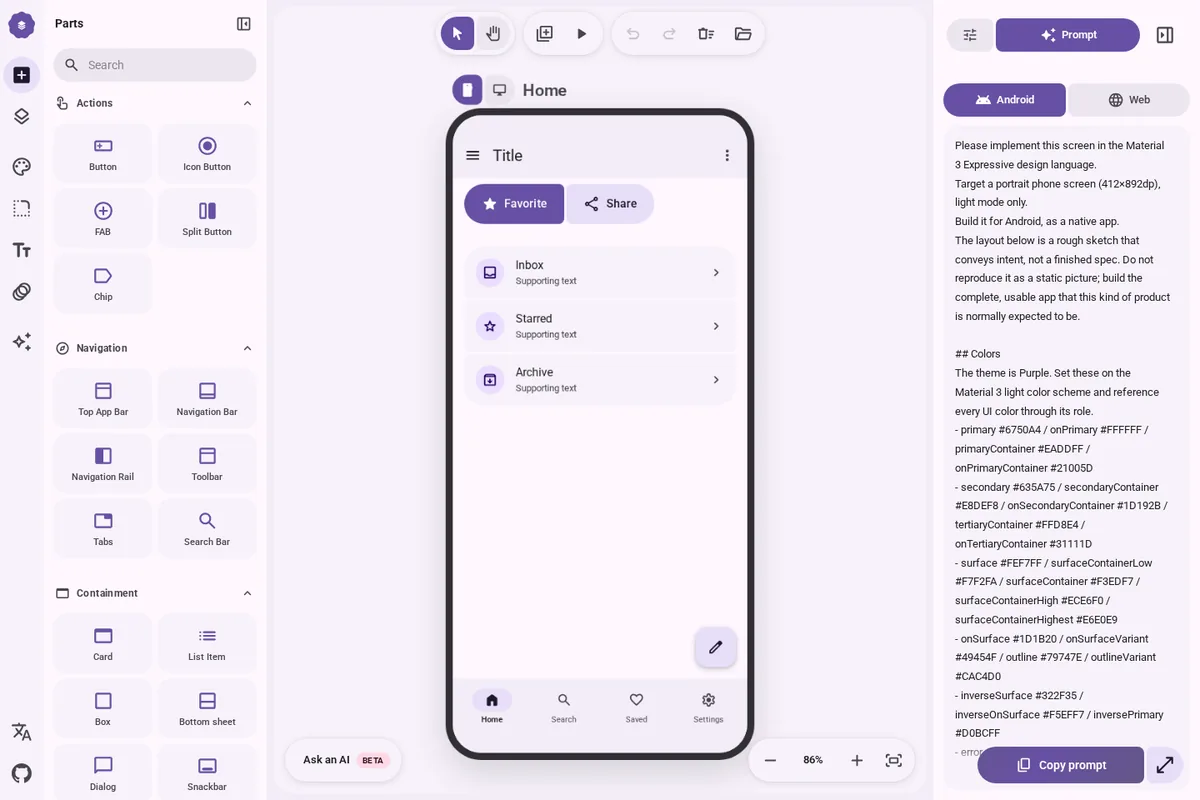
M3E Canvas:在浏览器里拖出 Material 3 界面草图,一键变成给 AI 写 App 的提示词 预览

详细介绍Details

一个免费开源的网页画板:左边是按谷歌 Material 3 Expressive(安卓最新一代设计语言)画好的零件,按钮、导航栏、卡片、列表、对话框、开关、滑块、搜索栏都有,拖到手机或电脑画框里就能拼出界面;两个按钮靠近会像磁铁一样粘成一组。可以加好几个页面,给按钮设「点了跳到哪页、用什么转场」,再按预览像真 App 一样点着走一遍。主题面板一次调完颜色(选一个主色自动生成整套配色、深浅色、对比度)、圆角、字体和动效。最关键的一步是「Prompt」:它把整套草图写成一段自然语言说明,可选中文、英文、日文、韩文,目标选安卓或网页,复制后贴进 Claude Code、Codex、Cursor 这类 AI 编程工具,让它照着把 App 写出来。也能导出 PNG、发分享链接。作品存在你自己的浏览器里,没有后台;想让 AI 帮写说明文字的话可以填自己的 OpenAI、Claude、Gemini 或 DeepSeek key。适合想把「脑子里的界面」讲清楚再交给 AI 的设计师和产品经理。 A free, open-source web canvas: the left panel holds parts drawn to Google’s Material 3 Expressive (Android’s newest design language), from buttons, navigation bars, cards, and lists to dialogs, switches, sliders, and search bars; drag them into a phone or desktop frame to build screens, and two buttons placed close together snap into a connected group. Add several screens, give any part a target screen and transition, then hit preview and tap through like a real app. One theme panel sets color (one seed color becomes a full scheme with light/dark and contrast levels), corner shape, type, and motion. The key step is “Prompt”: it writes the whole sketch up as a natural-language brief in Chinese, English, Japanese, or Korean, targeting Android or the web, ready to paste into Claude Code, Codex, Cursor, or another AI coding tool to build the app. You can also export PNGs or share a link. Work is saved in your own browser with no backend; an optional AI helper uses your own OpenAI, Claude, Gemini, or DeepSeek key to write part descriptions. Good for designers and PMs who want to spell out the interface in their head before handing it to AI.

适合学什么What to learn

  • 工具页 Tool

    在浏览器里生成 CSS/HTML 的小工具。 In-browser tools that generate CSS or HTML.

  • 游戏/互动 Game / interactive

    可直接玩或操作的教学游戏与 WebGL 演示。 Teaching games and WebGL demos you can play in the browser.

为什么推荐Why we recommend it 零件清单、磁吸成组、多页面跳转与转场、主题四项、四种语言的 Prompt 输出、安卓/网页两种目标、本地存储无后台、可选自带 key 的 AI 助手,都照 README 写。 The parts list, magnetic grouping, multi-screen navigation and transitions, the four theme axes, prompt output in four languages, Android/web targets, localStorage with no backend, and the optional bring-your-own-key AI helper follow the README.

核验记录:来源、抓取与截图说明Verification log: sources, checks, and captures

线索:作者 @lnkiai 的帖 https://x.com/lnkiai/status/2109221196600643765 (2026-10-11T09:54Z,约 10-11 17:54 北京时间),庆祝仓库过 9000 星。仓库 lnkiai/m3e-canvas 晚间 gh api:MIT、9148★,2026-09-02 创建,最近推送 2026-10-08;README 顶部挂着 Trendshift「当日第一」徽章。本库用 Playwright 打开线上版,确认默认示例页能显示,并点开 Prompt 面板看到英文、安卓目标的说明文字(含整套颜色值);没有自己拖零件拼页面,没有把提示词交给 AI 工具实际生成 App,也没测手机版编辑器。预览即这张 Prompt 面板实拍,1440×960 缩成 3:2 WebP 自托管。Lead: creator @lnkiai’s post https://x.com/lnkiai/status/2109221196600643765 (2026-10-11T09:54Z, about 17:54 on 10-11 Beijing time) celebrating 9,000 stars. Repo lnkiai/m3e-canvas on this evening’s gh api: MIT, 9148★, created 2026-09-02, last push 2026-10-08; the README shows a Trendshift “#1 repository of the day” badge. This library opened the live app in Playwright, confirmed the default sample screen renders, and opened the Prompt panel to see an English, Android-target brief including the full color values; it did not build screens itself, did not hand the prompt to an AI tool to generate an app, and did not test the phone editor. Preview is that Prompt panel capture, 1440×960 scaled to a self-hosted 3:2 WebP.

同类型Same type