详细介绍Details
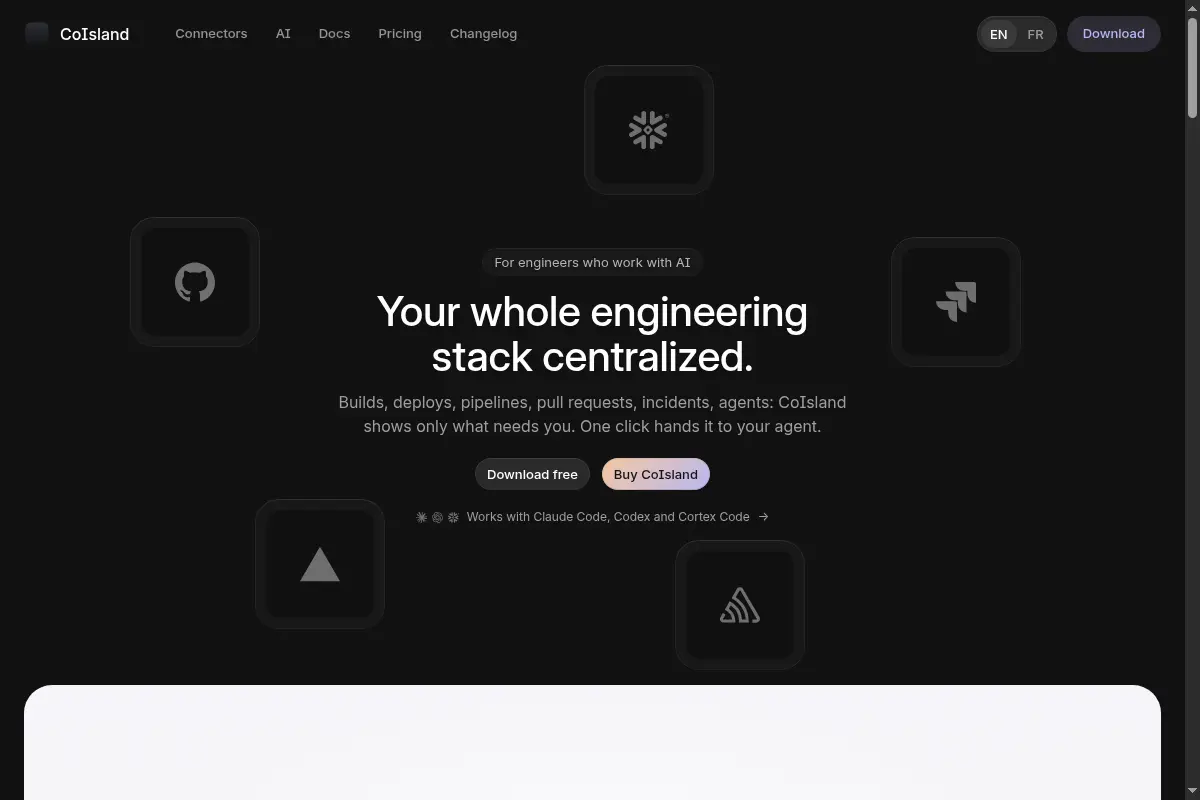
CoIsland 是一款只跑在 Mac 上的小应用,给同时盯着很多开发工具的人用。GitHub、Vercel、Sentry、Jira、Snowflake 这些地方一有状况,它就收成一条告警,出现在屏幕顶部的刘海里;你点一下,就能把这条告警交给 Claude Code、Codex 或 Cortex Code 去看。不买也能先试:最早的 2 条监控可以一直免费跑,不用注册。这是一条工具笔记:本库没有安装,也没有把真实告警交给任何助手。 CoIsland is a Mac-only app for people who watch a lot of developer tools at once. When something happens in GitHub, Vercel, Sentry, Jira, Snowflake, and the rest, it turns that into one alert in the notch at the top of the screen. One click hands that alert to Claude Code, Codex, or Cortex Code. You can try it without paying: the two oldest monitors keep running for free, with no account. This is a tool tip. This library did not install it and did not hand a real alert to any agent.
它是什么What it is
CoIsland 是一个住在 Mac 刘海(屏幕最上方那条凹槽)里的监视器。你给每个工具设一条监控:一句这个工具自己的查询,按你定的间隔去看,比如每 30 秒或每 5 分钟。出了状况才出现在刘海里,带上命中的行和备注。你点一下,Claude Code、Codex 或 Cortex Code 会在告警下面打开自己的命令行,第一条消息就是这份告警。站点写明它自己不带模型,用的是你已经登录的那三个助手。助手不能自己把告警关掉,关掉仍是你的事。适合一个人同时看着公司、副业和课业好几套 GitHub、部署和工单、不想再来回切浏览器标签的人。 CoIsland lives in the Mac notch, the cutout at the top of the screen. You set a monitor per tool: one query in that tool’s own language, checked on a schedule you pick, such as every 30 seconds or every 5 minutes. Only what fired shows up in the notch, with the matching rows and your notes. One click opens Claude Code, Codex, or Cortex Code in a terminal under the alert, and the first message is that alert. The site says CoIsland adds no model of its own. It starts the agent you already signed into. No agent can close an alert. You do. It is for someone watching several stacks at once — a job, a side project, coursework — and tired of tabbing between GitHub, deploys, and tickets.
为什么推荐Why we recommend it 评论 49971029 问会不会加 Cursor,作者回复 49971033「Yes We can! Will work on it.」——所以今天的助手名单里还没有 Cursor。首页 FAQ 写:连接器 35+;免费是最早的 2 条监控一直可用、不限时间、不用账号;许可证一次买断,早鸟价 $29.99 到 10 月 25 日,之后 $49.99,最多 2 台 Mac,含一年更新,这一年里的版本以后仍归你,再续一年更新是 $5.99,无订阅,30 天内可一键退款。页面还列了早鸟合计 $50.99(每把钥匙 $25.49)和 $112.49(每把钥匙 $22.49),每把钥匙仍是最多 2 台 Mac;页文没有把套装写成「几把」,这里不替它补数量。系统要求:苹果自研芯片(M1 或更新)、macOS 14 及以上,不支持 Intel;原生 Swift。隐私政策写开发者是蒙特利尔的 DonTizi;首页作者自述是蒙特利尔的应用 AI 工程师,并称自己从 2026 年 7 月起每天用刘海办公。本库没有把这两个名字核成同一个人。隐私政策比首页那句「没有 CoIsland 服务器」更细:工具数据留在本机,应用还会问更新服务器,买了之后还会问许可证服务器,这两处都不接收工具里的数据;「匿名上报我加了哪类连接器」默认关闭。把告警交给助手时,那份简报会进 Anthropic、OpenAI 或 Snowflake 你自己的账号。本库未下载、未安装、未接任何连接器、未把告警交给助手。 Comment 49971029 asks about Cursor; the author replied in 49971033 “Yes We can! Will work on it.” Cursor is not in today’s agent list. The homepage FAQ says 35+ connectors; the free tier is the 2 oldest monitors, forever, no account; a license is paid once, early bird $29.99 until October 25 then $49.99, for up to 2 Macs, with a year of updates, and the versions from that year stay yours. Another year of updates is $5.99. No subscription. 30 days to refund in one click. The page also lists early-bird totals of $50.99 ($25.49 a key) and $112.49 ($22.49 a key), each key still covering up to 2 Macs. The page does not spell the bundle as a key count, so none is added here. Requirements: Apple silicon (M1 or later), macOS 14 or newer, not Intel; native Swift. The privacy policy names DonTizi, an independent developer in Montreal. The homepage author describes themself as an applied AI engineer in Montréal and says they have run their days from the notch since July 2026. This library did not verify that those names are the same person. The privacy policy is more specific than the homepage line “no CoIsland server”: tool data stays on the Mac, while the app also contacts an update server and, after purchase, a license server. Neither receives tool data. “Share which connector types I add, anonymously” is off until you turn it on. Handing an alert to an agent sends that brief to Anthropic, OpenAI, or Snowflake under your own account. This library did not download, install, connect a tool, or hand over an alert.
核验记录:来源、抓取与截图说明Verification log: sources, checks, and captures
主源是产品页 https://coisland.app/ 。本环境 curl 直接请求会被 Cloudflare 拦成 403;撰写时用本机 Chrome 打开首页为 HTTP 200,标题 CoIsland: your whole engineering stack centralized。连接器页、助手页、隐私政策经可读文本抓取均为 200(https://coisland.app/connectors/ 、/agents/ 、/privacy/)。Show HN item 49970043(标题 Show HN: CoIsland – A local Mac app that monitors your dev tools and alerts you,作者 LeDonT,2026-10-05T20:14:52.000Z / 约 2026-10-06 04:14 CST)。撰写时 HN 页面与 Algolia 都是 9pts。预览为 Chrome 实拍首页首屏裁 3:2 WebP。不打星。Primary source is https://coisland.app/. A direct curl from this environment is blocked by Cloudflare with 403; local Chrome opened the homepage at HTTP 200, title CoIsland: your whole engineering stack centralized. The connectors, agents, and privacy pages were fetched as readable text at HTTP 200 (https://coisland.app/connectors/, /agents/, /privacy/). Show HN item 49970043 (title Show HN: CoIsland – A local Mac app that monitors your dev tools and alerts you, author LeDonT, 2026-10-05T20:14:52.000Z / about 04:14 CST on 2026-10-06). At write time the HN page and Algolia both showed 9pts. Preview is a Chrome capture of the homepage above the fold, cropped to 3:2 WebP. Unrated.