界面件 UI piece agent-api agent-api component component

Open Intelligent UI:开源版「会自己出界面的聊天」,换上你的设计系统和组件 Open Intelligent UI: an open-source chat that answers with interactive UI, built on your design system

开源的会出界面的聊天,能换成你自己的设计系统。 Open-source chat that answers with interactive UI, styled by your design system.
Open Intelligent UI:开源版「会自己出界面的聊天」,换上你的设计系统和组件 预览

详细介绍Details

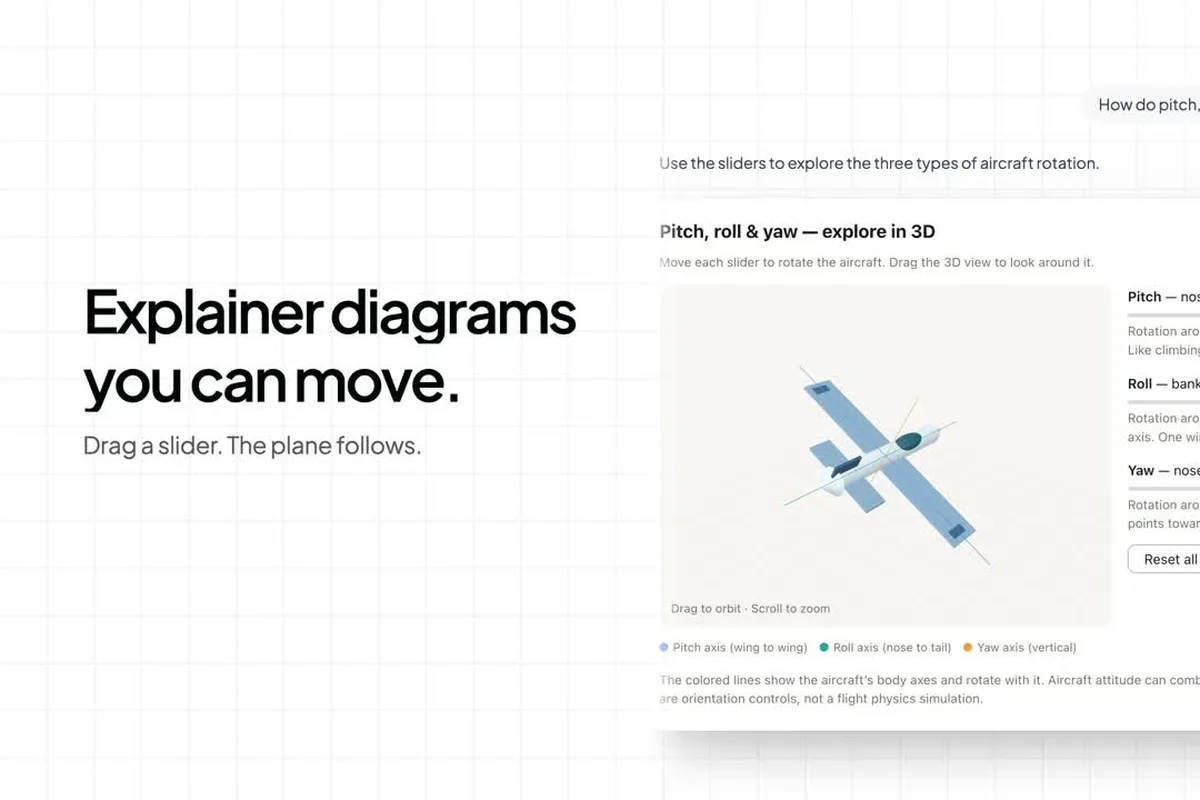
CopilotKit 开源的一套聊天界面模板,思路和 ChatGPT 10 月上线的 Intelligent UI 一样:你问一个问题,由 Agent 判断该回一段字、一个现成组件,还是当场生成一块能操作的小界面。官方演示里有四种:能拖滑块转的 3D 飞机(讲俯仰、横滚、偏航)、先出表格再一句话变成图表、能改总额/小费/人数的分账计算器、带编号图钉和地点照片的海岸行程地图。和直接用 ChatGPT 的区别是:代码 MIT 开源,你可以克隆下来,接自己的模型、自己的组件和设计规范(仓库里有单独的 design-system 包放主题、SVG 和表单样式),再改成自己产品里的回答方式;生成的 HTML/CSS/JS 放在隔离的 iframe 里跑。技术上前端是 Next.js + CopilotKit,后端是 Python Agent;默认用 OpenAI 的 chat-latest 写回答,用 TypeSafe 的 Jev 模型决定每轮该出哪种界面——简单表格走 A2UI,图表、示意图、计算器、地图走 Open Generative UI。另有一个可选的 MCP 服务,能把同样的出界面能力给别的 Agent 宿主用。适合做 AI 产品、想让回答不只是一段字的设计师和前端。 CopilotKit's open-source chat template built on the same idea as the Intelligent UI ChatGPT shipped in October: ask a question and the agent decides whether to answer with text, a native component, or a small interactive UI generated on the spot. The official demos show four: a 3D airplane you rotate with sliders (pitch, roll, yaw), a table that turns into a chart with one follow-up, a bill splitter with total/tip/people controls, and a coastal itinerary map with numbered pins and place photos. Unlike using ChatGPT, the code is MIT: clone it, plug in your own model, components, and design rules (a separate design-system package holds the theme, SVG, and form styles), and reshape how your product answers; generated HTML/CSS/JS runs in an isolated iframe. Under the hood it is Next.js + CopilotKit on the front and a Python agent on the back; by default OpenAI's chat-latest writes answers and TypeSafe's Jev model picks the presentation each turn, with simple tables via A2UI and charts, diagrams, calculators, and maps via Open Generative UI. An optional MCP server exposes the same UI generation to other agent hosts. Good for designers and front-end people building AI products who want answers that are more than text.

适合怎么用How to use it

  • 界面件 UI piece

    徽章、表盘、品牌球一类界面零件。 Badges, gauges, brand orbs, and other UI parts.

  • agent-api agent-api

    该类型下收录的 ThreeUI Community 免费组件。 Free ThreeUI Community components listed under this type.

  • component component

    该类型下收录的 ThreeUI Community 免费组件。 Free ThreeUI Community components listed under this type.

为什么推荐Why we recommend it 四个演示场景、默认模型 chat-latest、Jev 负责选界面、A2UI 与 Open Generative UI 的分工、iframe 沙箱、可选 MCP 服务都照 README 写;README 自己注明 54 秒发布片是渲染出来的演示画面,实际运行时每次由 Agent 生成、结果会变。本库没有 key,没有本地跑起来,也没核对两家 API 的费用。预览取自仓库 README 场景图(3D 飞机讲解),裁 3:2 WebP 自托管。 The four demo scenes, default chat-latest model, Jev choosing the presentation, the A2UI / Open Generative UI split, the iframe sandbox, and the optional MCP server follow the README; the README itself says the 54-second launch film shows rendered scenes and real runs are generated per request and vary. This library has neither key, did not run it locally, and did not check either API's pricing.

核验记录:来源、抓取与截图说明Verification log: sources, checks, and captures

线索:CopilotKit CEO Atai Barkai 的发布帖 https://x.com/ataiiam/status/2108553441199223093 (2026-10-09T13:41Z,约 10-09 21:41 北京时间;晚间约 6.2 万次浏览、597 赞、822 收藏),引用的是 OpenAI 的 GPT-6 / Intelligent UI 发布帖。仓库 CopilotKit/OpenIntelligentUI 晚间 gh api:MIT、2243★,2026-03-12 创建,最近一次推送 2026-10-09(加入「自带 API key」引导)。托管演示 opengenerativeui.copilotkit.ai 晚间 HTTP 200,但要先填 OpenAI 和 Jev 两把 key 才能聊天;Jev 在 TypeSafe 那边仍是早期访问。Lead: launch post by CopilotKit CEO Atai Barkai https://x.com/ataiiam/status/2108553441199223093 (2026-10-09T13:41Z, about 21:41 on 10-09 Beijing time; about 62K views, 597 likes, 822 bookmarks this evening), quoting OpenAI's GPT-6 / Intelligent UI launch post. Repo CopilotKit/OpenIntelligentUI on this evening's gh api: MIT, 2243★, created 2026-03-12, last push 2026-10-09 (bring-your-own-key onboarding). The hosted demo opengenerativeui.copilotkit.ai returned HTTP 200 this evening but needs both an OpenAI and a Jev key before chatting; Jev is still early access at TypeSafe. Preview is the README scene image (3D airplane explainer), cropped to a self-hosted 3:2 WebP.

给 AgentFor the Agent 克隆 CopilotKit/OpenIntelligentUI,`make setup && make dev` 后打开 http://localhost:3000,先点「Split the bill fairly」看它怎么生成可操作的小工具;再把 packages/design-system 里的主题换成你自己的颜色、字体和圆角,让生成的界面跟你的产品一致。需要自己的 OpenAI 和 TypeSafe(Jev)API key,用量计入你的账户。 Clone CopilotKit/OpenIntelligentUI, run make setup && make dev, open http://localhost:3000, and try “Split the bill fairly” to watch it generate a working tool; then swap the theme in packages/design-system for your own colors, fonts, and radii so generated UI matches your product. You need your own OpenAI and TypeSafe (Jev) API keys, billed to your accounts.

同类型Same type