界面件 UI piece

Agent Standup:把 Claude Code 的子 Agent 变成一场带配音的视频站会 Agent Standup: your Claude Code sub-agents as a voiced, animated stand-up call

Claude Code 的子 Agent 开起视频站会,谁卡住一眼看到。 Claude Code sub-agents become talking coworkers, so you see who is stuck.
Agent Standup:把 Claude Code 的子 Agent 变成一场带配音的视频站会 预览

详细介绍Details

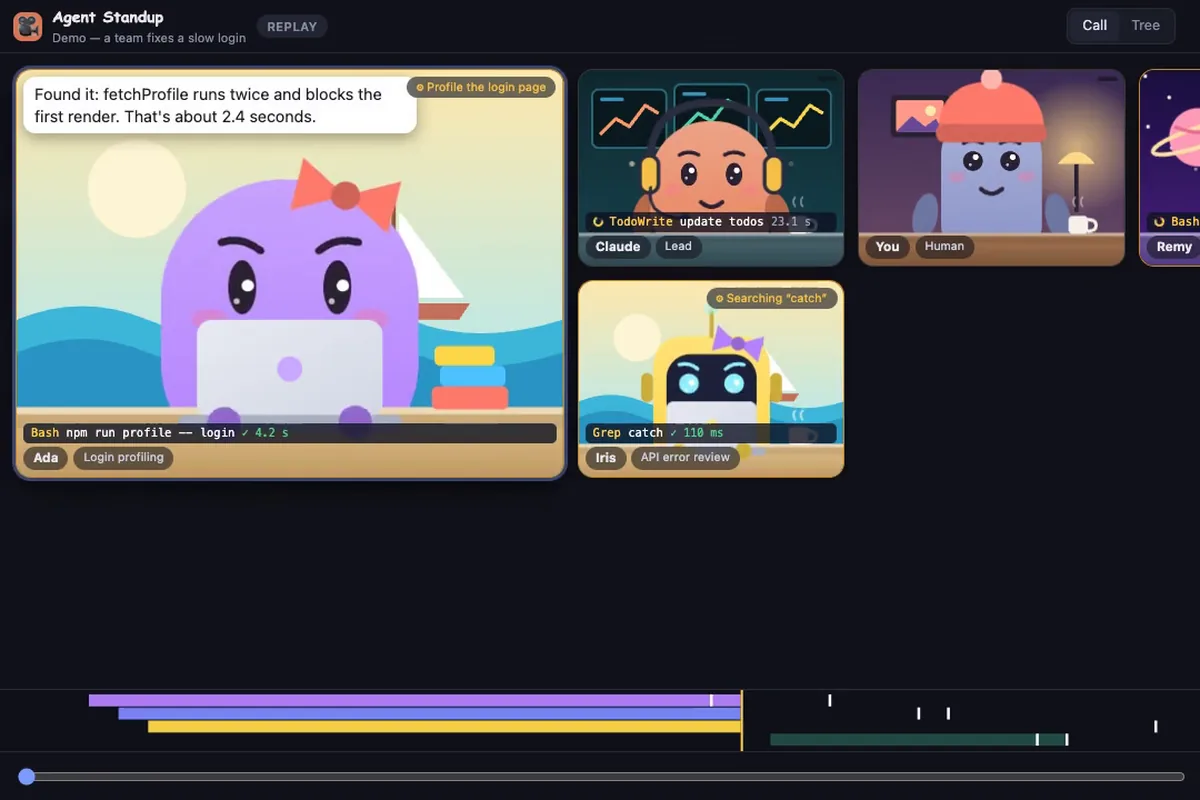
一个免费开源的小工具,把 Claude Code 干活的过程画成一场视频会议:主 Agent 是组长,派活时子 Agent 一个个「入会」,各自是坐在桌前的小角色,轮到谁说话谁就进大画面,还有真人配音、口型同步和字幕。某个 Agent 跑命令或改文件时,它会「共享屏幕」,你能看到真实的终端输出、正在读的文件或改动的那几行;做完汇报后过一会儿离会。一眼就能看出谁在等谁、谁卡住了:命令跑超一分钟的小窗会闪黄、三分钟没动静显示睡着、失败的调用有红色计数,还有每个 Agent 用了多少 token、上下文快满的提醒、一棵「谁派活给谁」的树。它只读取 Claude Code 本来就写在本地的会话文件,不额外调用模型(除非你开法语翻译或玩笑台词),所以作者说「零 token 成本」。能当 VS Code / Cursor 扩展、终端命令或 macOS 小应用用,可回放过去的会话、导出带配音的 MP4。界面有简体中文。作者自己也说「主要是好玩」,但对同时开好几个 Agent 的人,确实是一种更直观的盯进度方式。 A free, open-source tool that draws Claude Code’s work as a video call: the main agent is the lead, sub-agents “join” as they get tasks, each a small character at a desk, and whoever speaks takes the big frame with real voices, lip-sync, and subtitles. When an agent runs a command or edits a file it “shares its screen,” showing real terminal output, the file it reads, or the exact lines it changes, and it leaves the call a while after reporting back. You can see at a glance who is waiting on whom and who is stuck: a tile pulses amber when a command runs over a minute, shows asleep after three quiet minutes, and counts failed calls in red, plus per-agent token use, a context-fullness warning, and a tree of who asked whom. It only reads the session files Claude Code already writes locally and calls no model (unless you turn on French translation or jokes), hence “zero token cost.” Use it as a VS Code / Cursor extension, a terminal command, or a small macOS app; replay past sessions and export voiced MP4s. The interface includes Simplified Chinese. The author says it is mostly for fun, but for anyone running several agents at once it is a more visual way to keep track.

适合怎么用How to use it

  • 界面件 UI piece

    徽章、表盘、品牌球一类界面零件。 Badges, gauges, brand orbs, and other UI parts.

为什么推荐Why we recommend it 入会/离会、配音与口型、共享屏幕显示真实输出、卡住/安静/失败提示、token 与上下文计数、回放与视频导出、只读本地会话文件、九种界面语言(除英法外为 AI 初译)都照 README 和官网写;README 注明这是非官方社区项目,与 Anthropic 无关,Windows/Linux 版为实验性,macOS 应用未签名。本库没有本地跑 npx 或扩展,没接自己的会话。 Joining/leaving, voices and lip-sync, screen sharing with real output, stuck/quiet/failed indicators, token and context gauges, replay and video export, reading only local session files, and nine interface languages (all but English and French AI-drafted) follow the README and site; the README says it is an unofficial community project not affiliated with Anthropic, Windows/Linux builds are experimental, and the macOS app is unsigned. This library did not run the npx command or the extension and did not connect its own sessions.

核验记录:来源、抓取与截图说明Verification log: sources, checks, and captures

线索 HN item 50039630(2026-10-11T03:42Z,约 10-11 11:42 北京时间,撰写时 44pts、45 条评论)。仓库 Atoll92/agent-standup 晚间 gh api:MIT、104★,2026-10-10 创建,最近推送 2026-10-11;最新 release v1.24.3(2026-10-11T11:16Z),npm 包 @double_geste/agent-standup 同为 1.24.3、MIT。预览为官网 1 分钟演示视频(虚构团队,非用户数据)第 35 秒画面,裁 3:2 WebP 自托管。Lead: HN item 50039630 (2026-10-11T03:42Z, about 11:42 on 10-11 Beijing time, 44pts and 45 comments at write time). Repo Atoll92/agent-standup on this evening’s gh api: MIT, 104★, created 2026-10-10, last push 2026-10-11; latest release v1.24.3 (2026-10-11T11:16Z), and npm package @double_geste/agent-standup is also 1.24.3, MIT. Preview is the 35-second frame of the site’s 1-minute demo video (a fictional team, not user data), cropped to a self-hosted 3:2 WebP.

给 AgentFor the Agent 不用装编辑器也能先看效果:装好 Node 18+ 后运行 `npx @double_geste/agent-standup --open`,在 ⚙ → Source 里选 Demo,看虚构团队修慢登录页的演示;要跟自己的会话,先在这台电脑上用过 Claude Code,再在 VS Code 扩展里搜 Agent Standup(Cursor 用 release 里的 .vsix 安装)。导出视频前打开 ⚙ → Tools 里的隐藏代码选项,但 Agent 说出口的话不会被遮住。 See it without an editor: with Node 18+, run npx @double_geste/agent-standup --open and pick ⚙ → Source → Demo to watch a fictional team fix a slow login page. To follow your own sessions, use Claude Code on this machine at least once, then install Agent Standup from the VS Code Marketplace (in Cursor, install the .vsix from the release). Before exporting video, turn on the hide-code option in ⚙ → Tools, though what agents say aloud is not masked.

同类型Same type