Agent UI / Predictive Arc Predictive Arc

精选 Featured ThreeUI Community ThreeUI Community 背景场 Background 动效 Motion 界面件 UI piece

Predictive Arc Predictive Arc

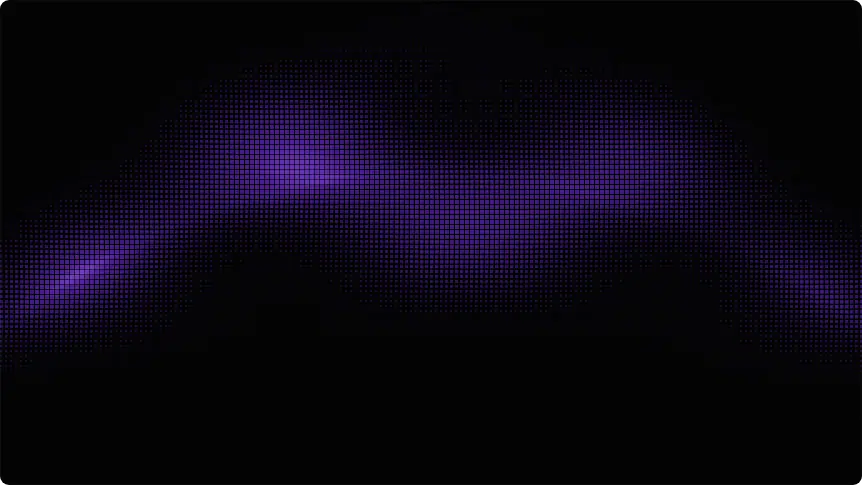
Canvas / WebGL 信号弧:预测弧、像素弧、粒子、网格与半调流动。免费变体都在 Community 目录里。 Canvas / WebGL signal arcs: predictive arc, pixel arc, particles, grid, and halftone flow. Free variants live in the Community directory.
打开原文Open source 按类型By type

适合怎么用How to use it

  • 背景场 Background

    铺满画布的场:星座、结构流、传送门一类背景。 Full-canvas fields: constellations, structure flow, portals, and similar backdrops.

  • 动效 Motion

    偏运动与粒子的场面,强调节奏而不是表单。 Motion- and particle-led scenes that care more about rhythm than forms.

  • 界面件 UI piece

    徽章、表盘、品牌球一类界面零件。 Badges, gauges, brand orbs, and other UI parts.

收录理由Why we listed it 仪表盘或「推理中」状态很好用。把 prompt 交给 Agent,调 hue / speed,做成自己的数据弧,不要去碰 Pro 变体。 Works well for a dashboard or “thinking” state. Hand the prompt to an Agent, tune hue / speed, and make it your data arc — stay off Pro variants.

给 AgentFor the Agent 把 Predictive Arc 嵌进控制台顶栏。用免费变体,改成品牌琥珀色,速度放慢,保持可读。 Drop Predictive Arc into a console top bar. Use a free variant, switch to brand amber, slow it down, and keep it readable.

Predictive Arc 预览

同类型Same type